
350-601 · Question #690
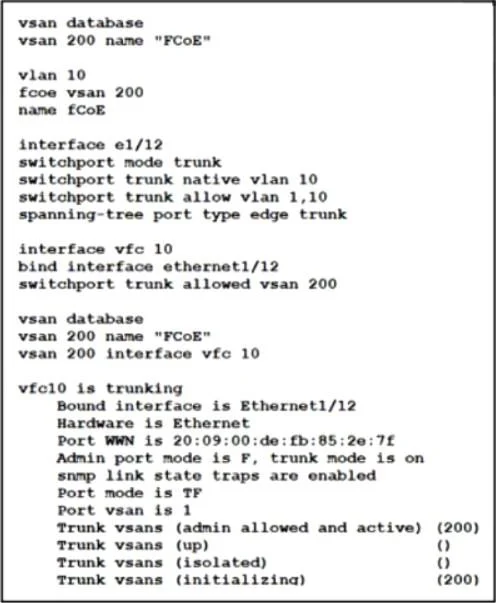
Refer to the exhibit. An FCoE-attached storage connects to a Cisco Nexus 9000 Series Switch on interface ethernet1/12. After the configuration was performed, VSAN 200 failed to activate on the vfc…
The correct answer is C. Bind VSAN 200 on interface ethernet1/12. The issue is that VSAN 200 is stuck in the "initializing" state, which typically indicates that the underlying Ethernet interface (eth1/12) is not properly bound to the VSAN. While the vFC interface (vfc10) is configured correctly and bound to eth1/12, the physical Ethernet…
Question
Refer to the exhibit. An FCoE-attached storage connects to a Cisco Nexus 9000 Series Switch on interface ethernet1/12. After the configuration was performed, VSAN 200 failed to activate on the vfc interface. Which configuration action must be performed to bring up VSAN 200?
Exhibit
Options
- AConfigure interface vfc 10 as a node port.
- BChange the native VLAN on the trunk port.
- CBind VSAN 200 on interface ethernet1/12.
- DTrunk the FCoE VLAN on interface vfc 10.
How the community answered
(38 responses)- A11% (4)
- B3% (1)
- C82% (31)
- D5% (2)
Explanation
The issue is that VSAN 200 is stuck in the "initializing" state, which typically indicates that the underlying Ethernet interface (eth1/12) is not properly bound to the VSAN. While the vFC interface (vfc10) is configured correctly and bound to eth1/12, the physical Ethernet interface must also be associated with the VSAN for the FCoE traffic to be carried properly. vsan 200 interface ethernet1/12 This binds VSAN 200 to the physical Ethernet interface, enabling proper FCoE traffic forwarding and allowing the vFC to fully come up. Node port mode is for FCoE NPV/NVE topologies, not relevant here. Native VLAN is unrelated unless it’s misconfigured, which is not indicated here. Trunking FCoE VLAN on vFC is invalid; vFC interfaces are not VLAN-trunked, they are VSAN-mapped.
Topics
Community Discussion
No community discussion yet for this question.