350-601 · Question #544
Refer to the exhibit. An engineer configures FCoE in a newly installed data center. Which configuration must be applied to activate VSAN 100 on VFC 100?
The correct answer is A. Map an FCoE VLAN to VSAN 100. To activate a VSAN on a Virtual Fibre Channel (VFC) interface for FCoE, a specific FCoE VLAN must be mapped to that VSAN. This mapping links the Ethernet network to the Fibre Channel over Ethernet fabric, allowing FCoE traffic to flow correctly.
Question
Refer to the exhibit. An engineer configures FCoE in a newly installed data center. Which configuration must be applied to activate VSAN 100 on VFC 100?
Exhibit
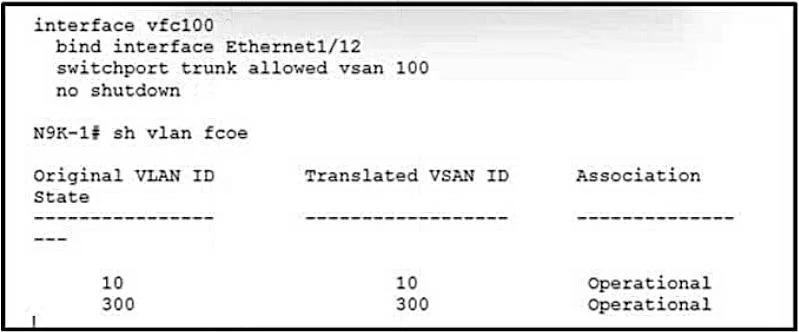
Options
- AMap an FCoE VLAN to VSAN 100.
- BAllow VSAN 100 on interface eth1/12.
- CIssue the shutdown lan command on VFC 100.
- DConfigure a VLAN on VFC 100.
How the community answered
(56 responses)- A77% (43)
- B14% (8)
- C5% (3)
- D4% (2)
Why each option
To activate a VSAN on a Virtual Fibre Channel (VFC) interface for FCoE, a specific FCoE VLAN must be mapped to that VSAN. This mapping links the Ethernet network to the Fibre Channel over Ethernet fabric, allowing FCoE traffic to flow correctly.
In Fibre Channel over Ethernet (FCoE), VSANs are activated on VFC interfaces by mapping them to specific FCoE VLANs. This mapping allows FCoE frames carrying Fibre Channel traffic for a particular VSAN to be encapsulated within a designated Ethernet VLAN on the underlying physical Ethernet interface, making the VSAN operational on the VFC.
Allowing a VSAN on an Ethernet interface is part of configuring a trunk, but the direct activation on a VFC for FCoE requires the VLAN-to-VSAN mapping.
Issuing a 'shutdown lan' command on a VFC interface would administratively disable the LAN component of the FCoE interface, preventing traffic flow, not activating a VSAN.
While a VLAN is involved in FCoE, simply configuring 'a VLAN' on a VFC 100 interface is insufficient; the specific action required is to explicitly map an FCoE VLAN to the VSAN.
Concept tested: FCoE VSAN activation via VLAN mapping
Source: https://www.cisco.com/c/en/us/td/docs/switches/datacenter/nexus9000/sw/7x/fcoe/configuration/guide/b-cisco-nexus-9000-series-nx-os-fcoe-configuration-guide-7x/b-cisco-nexus-9000-series-nx-os-fcoe-configuration-guide-7x_chapter_01.html
Topics
Community Discussion
No community discussion yet for this question.
