
350-601 · Question #528
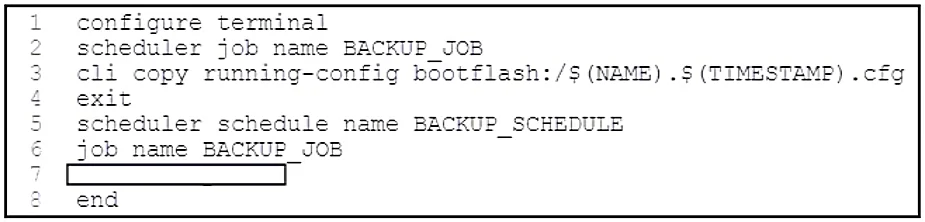
Refer to the exhibit. The Cisco NX-OS scheduler must run every day at 3:00 a.m. Which code snippet completes the script?
The correct answer is D. time daily 3:00. To configure a Cisco NX-OS scheduler job to run every day at 3:00 a.m., the time daily HH:MM command must be used.
Question
Refer to the exhibit. The Cisco NX-OS scheduler must run every day at 3:00 a.m. Which code snippet completes the script?
Exhibit
Options
- Atime start daily 3:00
- Btime start weekly 7 3:00
- Ctime weekly 7 3:00
- Dtime daily 3:00
How the community answered
(54 responses)- A4% (2)
- B2% (1)
- C7% (4)
- D87% (47)
Why each option
To configure a Cisco NX-OS scheduler job to run every day at 3:00 a.m., the `time daily HH:MM` command must be used.
The `start` keyword is not part of the standard `time daily` scheduler syntax in Cisco NX-OS.
This option specifies a `weekly` schedule on day 7 (Sunday), which does not fulfill the requirement for a daily execution, and includes an incorrect `start` keyword.
This option configures the job to run only once a week on day 7 (Sunday), which does not meet the requirement for a daily execution.
The `time daily 3:00` command correctly specifies that the scheduler job should execute once every day at 3:00 a.m., precisely matching the requirement for a daily recurring task at a specific time within Cisco NX-OS scheduler configuration.
Concept tested: NX-OS scheduler configuration syntax
Source: https://www.cisco.com/c/en/us/td/docs/switches/datacenter/nexus9000/sw/7-x/prog_n_m/b_Cisco_Nexus_9000_Series_NX-OS_Programmability_Guide_7x/b_Cisco_Nexus_9000_Series_NX-OS_Programmability_Guide_7x_chapter_011.html
Topics
Community Discussion
No community discussion yet for this question.