
350-601 · Question #517
Refer to the exhibit. An engineer must access a Cisco UCS C-Series server KVM from a remote location. The engineer must use the out-of-band interface to access the KYM. Which configuration set meets…
The correct answer is C. NIC mode: Dedicated. To access a Cisco UCS C-Series server KVM using the out-of-band interface, the NIC mode for the Cisco IMC must be configured as Dedicated.
Question
Refer to the exhibit. An engineer must access a Cisco UCS C-Series server KVM from a remote location. The engineer must use the out-of-band interface to access the KYM. Which configuration set meets these requirements?
Exhibit
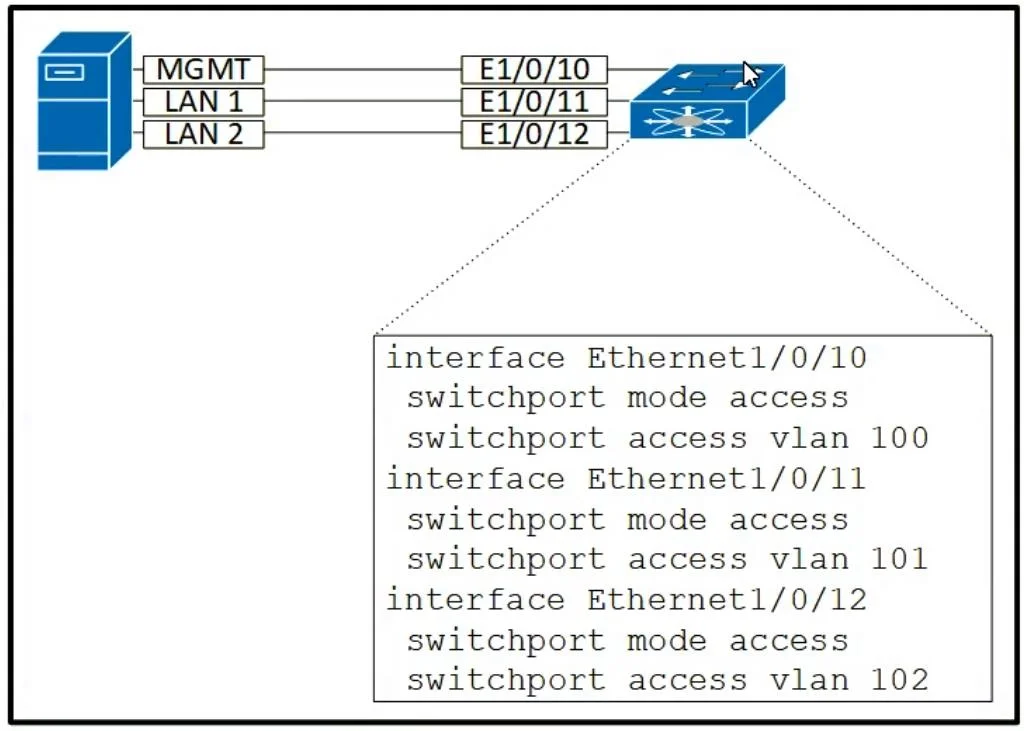
Options
- ANIC mode: Shared LOM
- BNIC mode: Dedicated
- CNIC mode: Dedicated
- DNIC mode: Shared LOM
How the community answered
(25 responses)- A4% (1)
- B8% (2)
- C84% (21)
- D4% (1)
Why each option
To access a Cisco UCS C-Series server KVM using the out-of-band interface, the NIC mode for the Cisco IMC must be configured as Dedicated.
Shared LOM (LAN On Motherboard) mode allows the IMC to share the server's network interfaces with the host OS, which might not be considered a truly "out-of-band" interface for KVM access as it depends on the server's physical network connections.
While "Dedicated" NIC mode is correct, the inclusion of a specific IPv4 address (192.168.10.10) is an example and not the core configuration for out-of-band KVM access, which is the NIC mode itself.
For out-of-band KVM access to a Cisco UCS C-Series server, the Cisco IMC (Integrated Management Controller) requires a dedicated network interface. Setting the NIC mode to Dedicated ensures that the IMC has its own network port for management traffic, including KVM, independent of the server's operating system network interfaces.
Shared LOM mode does not meet the requirement of a truly independent out-of-band interface for KVM access, as it relies on sharing the server's LAN interfaces.
Concept tested: Cisco UCS C-Series KVM access via Dedicated NIC mode
Source: https://www.cisco.com/c/en/us/td/docs/unified_computing/ucs/c/hw/C240M6/install/C240M6/install_chapter_01.html#d24937e283a1607
Topics
Community Discussion
No community discussion yet for this question.