
Cisco
350-601 · Question #450
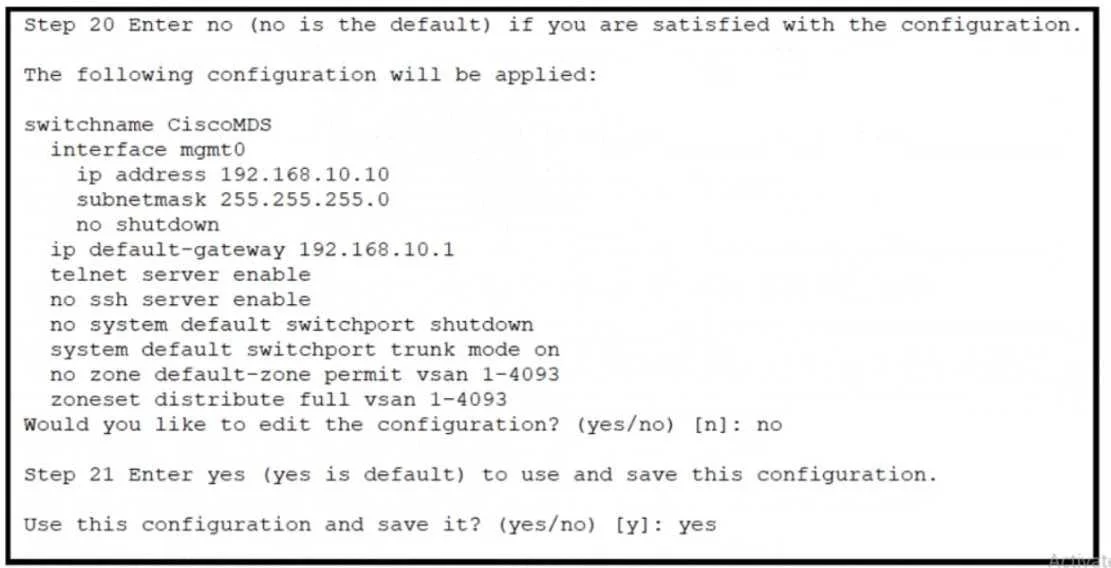
Refer to the exhibit. An engineer is configuring a Cisco MDS 9000 Series Switch for the first time. After the initial setup process, the name server at IP 192.168.10.11 is missing from the…
Sign in or unlock 350-601 to reveal the answer and full explanation for question #450. The question stem and answer options stay visible for context.
Storage Network
Question
Refer to the exhibit. An engineer is configuring a Cisco MDS 9000 Series Switch for the first time. After the initial setup process, the name server at IP 192.168.10.11 is missing from the configuration. Which set of actions completes the configuration?
Exhibit
Options
- AEnter no at step 21 and reinitialize the installer. Press the Esc key to access ROMMON mode.
- BEnter no at step 21 and reload the switch. Configure the advanced IP options.
- CEnter yes at step 21 to edit the configuration. Add the line dns-server 192.168.10.11.
- DEnter yes at step 21 and log in. Modify the startup configuration DNS
Unlock 350-601 to see the answer
You've previewed enough free 350-601 questions. Unlock 350-601 for full answers, explanations, the timed quiz mode, progress tracking, and the master PDF. Question stem and options stay visible so you can still see what's on the exam.
Topics
#Cisco MDS#Initial Configuration#DNS#Setup Wizard