
350-601 · Question #419
Refer to the exhibit. An engineer is creating a SPAN session to send a copy of all the Fabric-A VSAN 11 traffic on N5K_1 to the monitoring laptop. The configuration that presented has already been…
The correct answer is D. Select VSAN 11 as the source of traffic. To complete the configuration for a SAN SPAN session on a Cisco Nexus 5000 Series Switch for Fabric-A VSAN 11 traffic, the specific VSAN must be designated as the source.
Question
Refer to the exhibit. An engineer is creating a SPAN session to send a copy of all the Fabric-A VSAN 11 traffic on N5K_1 to the monitoring laptop. The configuration that presented has already been applied to Cisco UCS Manager. Which action competes the configuration?
Exhibit
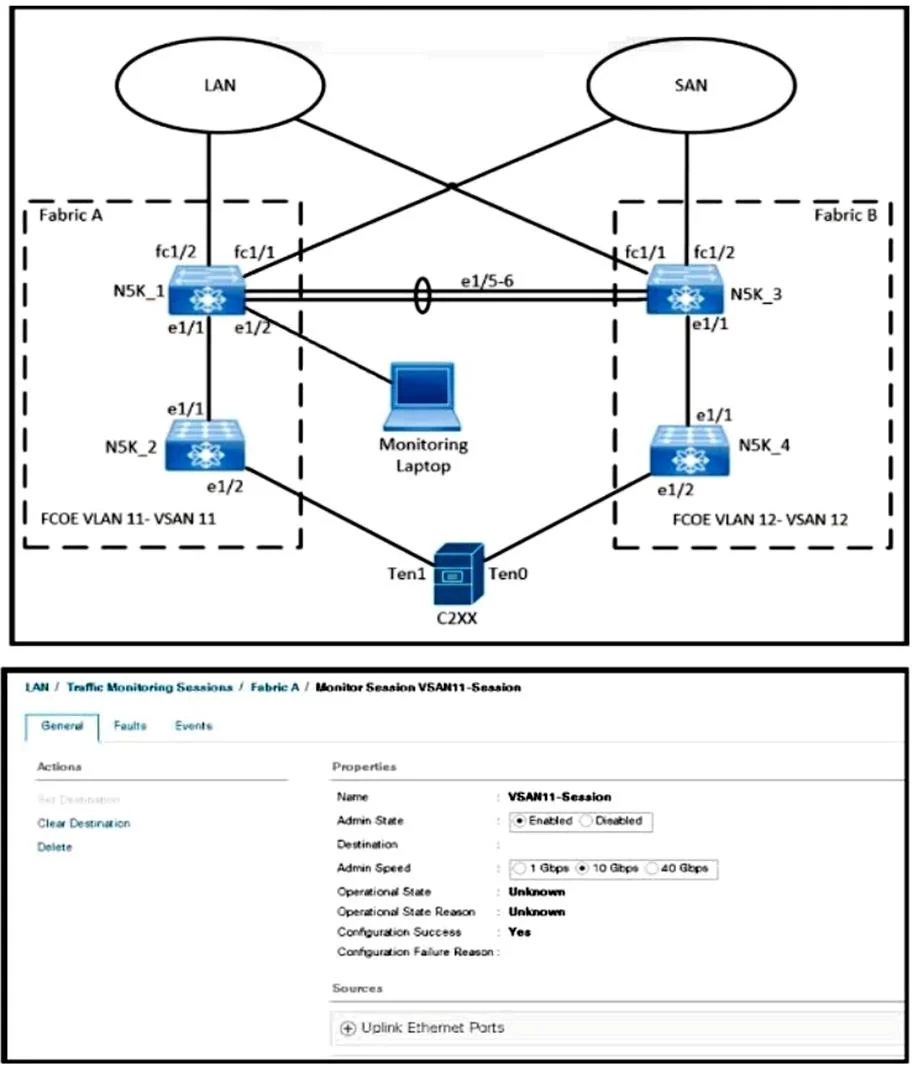
Options
- AActivate a NetFlow monitoring session
- BCreate a SAN traffic rnonitoring session
- CSet VLAN 11 as the traffic destination
- DSelect VSAN 11 as the source of traffic.
How the community answered
(47 responses)- A4% (2)
- B15% (7)
- C9% (4)
- D72% (34)
Why each option
To complete the configuration for a SAN SPAN session on a Cisco Nexus 5000 Series Switch for Fabric-A VSAN 11 traffic, the specific VSAN must be designated as the source.
Activating a NetFlow monitoring session is for IP traffic, not Fibre Channel traffic on an N5K for SAN monitoring.
Creating a SAN traffic monitoring session is a general action; the question asks for the specific detail to *complete* the configuration, which is defining the source.
Setting VLAN 11 as the traffic destination is incorrect; VLANs are for Ethernet, VSANs are for Fibre Channel, and the destination is typically a physical interface where the monitoring device is connected, not a VSAN.
For a SAN SPAN session to monitor all traffic within a specific Fibre Channel VSAN, that VSAN (VSAN 11 in this case) must be explicitly selected as the source of traffic to be mirrored.
Concept tested: SAN SPAN source configuration (VSAN)
Source: https://www.cisco.com/c/en/us/td/docs/unified_computing/ucs/sw/cli/config/guide/1_3_1/b_CLI_Config_Guide_1_3_1/b_CLI_Config_Guide_1_3_1_chapter_01101.html#concept_A2B591AE369C4E0495811776949313CC
Topics
Community Discussion
No community discussion yet for this question.