
350-601 · Question #358
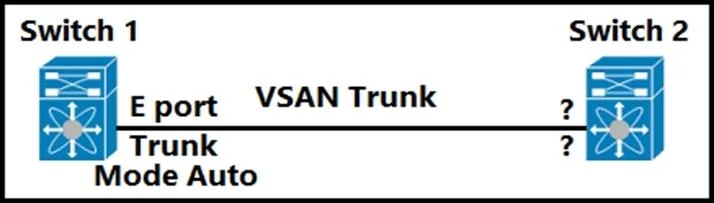
Refer to the exhibit. Which feature must be used to configure on switch 2 to establish a VSAN trunk between switch 1 and switch 2?
The correct answer is B. E Port. In Fibre Channel switching, an E Port (Expansion Port) is used to create Inter-Switch Links (ISLs) between two fabric switches, which is the basis for a VSAN trunk. When two E ports connect, they negotiate a TE (Trunking Expansion) port relationship that carries multiple VSANs…
Question
Refer to the exhibit. Which feature must be used to configure on switch 2 to establish a VSAN trunk between switch 1 and switch 2?
Exhibit
Options
- AF port
- BE Port
- CN Port
- DNP Port
How the community answered
(49 responses)- A4% (2)
- B92% (45)
- C2% (1)
- D2% (1)
Explanation
In Fibre Channel switching, an E Port (Expansion Port) is used to create Inter-Switch Links (ISLs) between two fabric switches, which is the basis for a VSAN trunk. When two E ports connect, they negotiate a TE (Trunking Expansion) port relationship that carries multiple VSANs over the trunk link. F Ports (A) connect to end-node HBAs, N Ports (C) are the end-node side of a switch-to-host connection, and NP Ports (D) are used in NPV (N Port Virtualizer) mode where the edge switch proxies FLOGIs to a core switch - none of these establish a VSAN trunk between two switches.
Topics
Community Discussion
No community discussion yet for this question.