
350-601 · Question #204
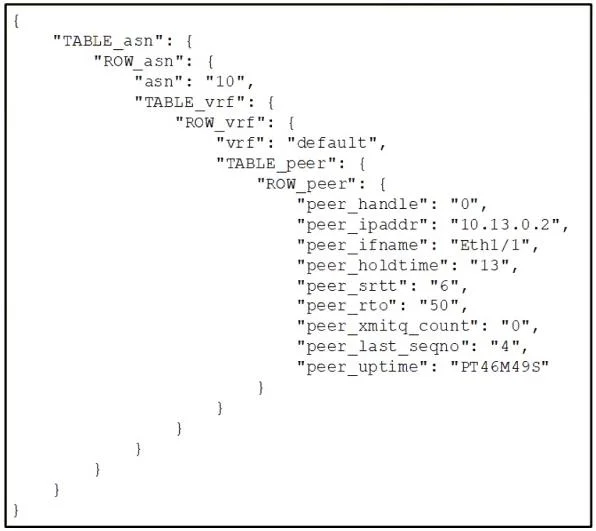
Refer to the exhibit. An engineer uses Python in Cisco NX-OS guest shell to retrieve the configuration of the EIGRP ASN on interface eth1/1. The engineer has written this script: >>> import json >>>…
The correct answer is D. >>> output = json.loads(clid('show ip eigrp neighbors')) >>> output['asn']. To retrieve the value of the 'asn' key from the EIGRP neighbor configuration using Python in NX-OS guest shell, the output from the clid() command must first be parsed from a JSON string into a Python object using json.loads(), and then the 'asn' key can be directly accessed…
Question
Refer to the exhibit. An engineer uses Python in Cisco NX-OS guest shell to retrieve the configuration of the EIGRP ASN on interface eth1/1. The engineer has written this script:
import json >>> from cli import* Which command set must be used to retrieve the value of the 'asn' key?
Exhibit
Options
- A
output = json.loads(clid('show ip eigrp neighbors')) >>>
- B
output = json.dumps(clid('show ip eigrp neighbors')) >>>
- C
output = json.dumps(clid('show ip eigrp neighbors')) >>> output['asn']
- D
output = json.loads(clid('show ip eigrp neighbors')) >>> output['asn']
How the community answered
(28 responses)- A4% (1)
- B7% (2)
- C14% (4)
- D75% (21)
Why each option
To retrieve the value of the 'asn' key from the EIGRP neighbor configuration using Python in NX-OS guest shell, the output from the `clid()` command must first be parsed from a JSON string into a Python object using `json.loads()`, and then the 'asn' key can be directly accessed from the resulting dictionary.
This option correctly parses the JSON output into a Python object but does not complete the task of retrieving the 'asn' key's value.
`json.dumps()` converts a Python object into a JSON formatted string, which is the opposite of what is needed to parse CLI output for data extraction.
This option incorrectly uses `json.dumps()` instead of `json.loads()` and would attempt to access a key from a JSON string, which would result in an error.
The `clid()` function executes a CLI command, returning its output as a string. To extract structured data like the 'asn' key, this string (assumed to be in JSON format, potentially via `| json`) must be converted into a Python dictionary or list using `json.loads()`. Once parsed into a Python object, dictionary-style key access `output['asn']` can then retrieve the specific value.
Concept tested: Python scripting in NX-OS Guest Shell - JSON parsing
Source: https://www.cisco.com/c/en/us/td/docs/switches/datacenter/nexus9000/sw/7-x/prog_guide/b_Cisco_Nexus_9000_Series_NX-OS_Programmability_Guide_7x/b_Cisco_Nexus_9000_Series_NX-OS_Programmability_Guide_7x_chapter_0100.html
Topics
Community Discussion
No community discussion yet for this question.