
350-601 · Question #153
A Cisco UCS C-Series server is installed at a data center. The server should be managed by the Cisco UCS Manager by using a single cable for management and data traffic. Which configuration should…
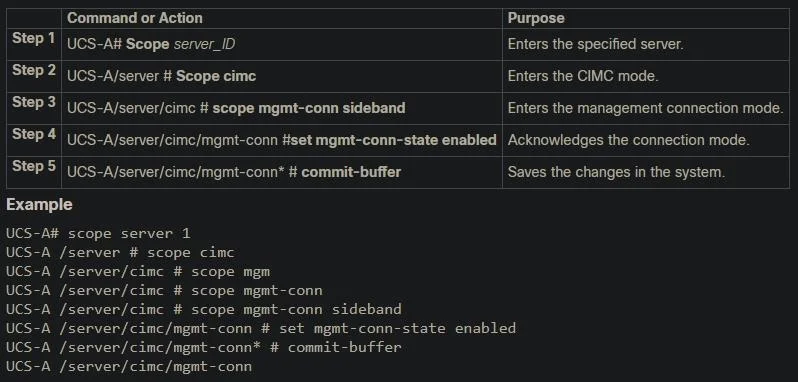
The correct answer is D. UCS-A# scope server 1. When integrating a UCS C-Series rack server into UCS Manager using a single cable (enabled by the Cisco Virtual Interface Card), the server is managed as a directly connected server rather than a chassis-mounted blade. The correct starting scope is 'scope server 1', which…
Question
A Cisco UCS C-Series server is installed at a data center. The server should be managed by the Cisco UCS Manager by using a single cable for management and data traffic. Which configuration should be applied after the Physical connection is established?
Exhibit
Options
- AUCS-A# scope server 1
- BUCS-A# scope chassis 1
- CUCS-A# scope chassis 1
- DUCS-A# scope server 1
How the community answered
(48 responses)- A4% (2)
- B2% (1)
- D94% (45)
Explanation
When integrating a UCS C-Series rack server into UCS Manager using a single cable (enabled by the Cisco Virtual Interface Card), the server is managed as a directly connected server rather than a chassis-mounted blade. The correct starting scope is 'scope server 1', which accesses the individual rack server object in UCS Manager where you can then enable UCS Manager integration, configure service profiles, and manage adapters. Option B and C ('scope chassis 1') are used for blade server chassis, which is the wrong object type for a C-Series rack server. Option A also shows 'scope server 1' but contains incorrect sub-commands. The single-cable approach uses the Cisco VIC to carry CIMC management traffic and Ethernet/FC data traffic over a single physical connection to the fabric interconnect.
Topics
Community Discussion
No community discussion yet for this question.