
350-501 · Question #404
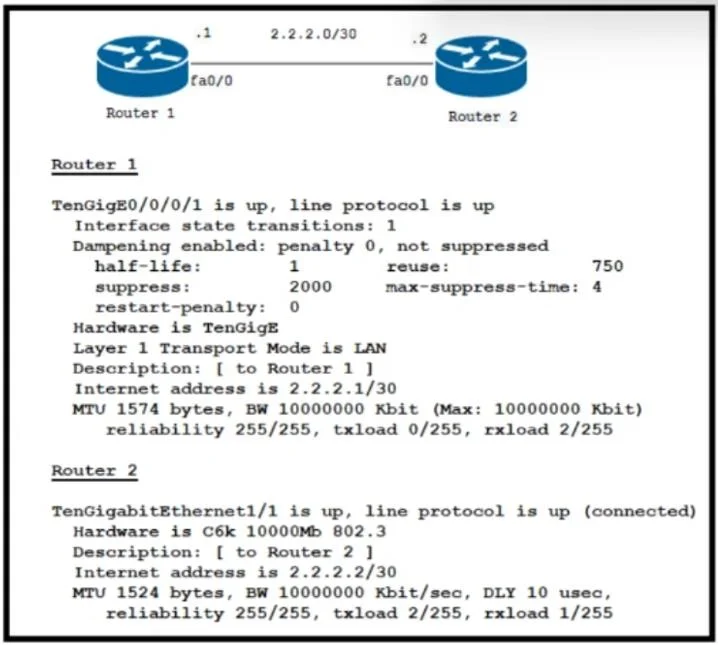
Refer to the exhibit. Router 1 and Router 2 were installed in the data center Router 1 is the core router in the network, but it fails to establish an OSPF peering with Router 2, and customer…
The correct answer is A. Change the MTU to 1524 on Router 1. The OSPF peering failure between R1 and R2, coupled with high CPU and memory usage on R1 while R2 remains stable, strongly indicates an MTU mismatch. R1 likely has a smaller MTU and is struggling to process larger OSPF Database Description (DBD) packets sent by R2. Aligning…
Question
Refer to the exhibit. Router 1 and Router 2 were installed in the data center Router 1 is the core router in the network, but it fails to establish an OSPF peering with Router 2, and customer traffic is unable to pass. Router 1 also reports an increase in CPU and memory usage. However, the CPU for R2 is stable. Which action resolves this issue?
Exhibit
Options
- AChange the MTU to 1524 on Router 1.
- BDisable Cisco Express Forwarding on Router 2.
- CChange the transport mode to WAN on Rooter 1.
- DEnable MPLS on Router 2.
How the community answered
(37 responses)- A73% (27)
- B8% (3)
- C16% (6)
- D3% (1)
Why each option
The OSPF peering failure between R1 and R2, coupled with high CPU and memory usage on R1 while R2 remains stable, strongly indicates an MTU mismatch. R1 likely has a smaller MTU and is struggling to process larger OSPF Database Description (DBD) packets sent by R2. Aligning R1's MTU to match R2's (e.g., 1524) will resolve the peering issue.
An MTU mismatch between OSPF neighbors is a common cause for OSPF peering to get stuck in the EXSTART/EXCHANGE state and fail to establish full adjacency. If Router 1 has a smaller MTU than Router 2, it will drop OSPF Database Description (DBD) packets from Router 2, leading to retransmissions and increased CPU/memory usage on Router 1. Setting the MTU on Router 1 to 1524 will resolve this mismatch and allow the OSPF adjacency to form successfully.
Disabling Cisco Express Forwarding (CEF) would typically increase CPU usage for packet forwarding rather than resolve an OSPF peering issue or CPU spikes on a different router.
"Transport mode" is not a standard OSPF configuration setting that would directly affect peering establishment.
Enabling MPLS on Router 2 is related to label switching and has no direct bearing on resolving OSPF peering failures or high CPU utilization caused by MTU mismatches.
Concept tested: OSPF MTU mismatch troubleshooting
Source: https://www.cisco.com/c/en/us/support/docs/ip/open-shortest-path-first-ospf/13689-19.html
Topics
Community Discussion
No community discussion yet for this question.