
350-401 · Question #905
Drag and Drop Question Please drag and drop the options provided in the left to configure NTP in client mode. Answer:
The correct answer is Configure an authentication key pair for NTP and specify whether the key will be trusted or untrusted.; Set the IP address of the NTP server and the public key.; Enable NTP client mode.; Enable NTP authentication. Configuring NTP in client mode follows a logical sequence: first, you must configure the authentication key pair and define it as trusted or untrusted, then associate the NTP server IP with that public key, then enable NTP client mode to begin synchronization, and finally…
Question
Drag and Drop Question Please drag and drop the options provided in the left to configure NTP in client mode. Answer:
Exhibit
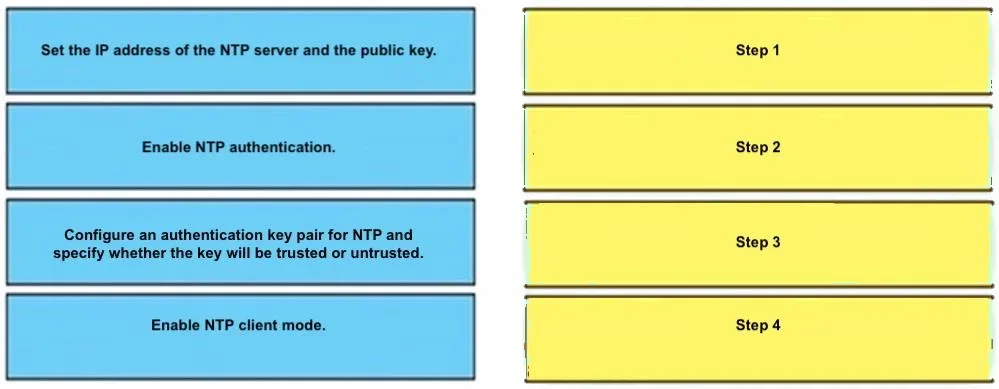
Answer Area
Drag items
Correct arrangement
- Configure an authentication key pair for NTP and specify whether the key will be trusted or untrusted.
- Set the IP address of the NTP server and the public key.
- Enable NTP client mode.
- Enable NTP authentication.
Explanation
Configuring NTP in client mode follows a logical sequence: first, you must configure the authentication key pair and define it as trusted or untrusted, then associate the NTP server IP with that public key, then enable NTP client mode to begin synchronization, and finally enable NTP authentication to enforce secure time synchronization. This order ensures that authentication credentials are in place before the client attempts to connect and authenticate with the server. Skipping or reordering these steps can result in authentication failures or an unsecured NTP configuration.
Topics
Community Discussion
No community discussion yet for this question.