
350-401 · Question #855
Drag and Drop Question Drag and drop the snippets onto the blanks within the code to create an EEM script that adds an entry to a locally stored text file with a timestamp when a configuration…
The correct answer is event syslog pattern; enable; | append flash. The correct EEM script uses 'event syslog pattern' to detect configuration changes by monitoring syslog messages (such as %SYS-5-CONFIG_I), 'enable' to run the applet in privileged EXEC mode so it has the necessary permissions to write to flash, and '| append flash' to redirect…
Question
Drag and Drop Question Drag and drop the snippets onto the blanks within the code to create an EEM script that adds an entry to a locally stored text file with a timestamp when a configuration change is made. Not all options are used. Answer:
Exhibit
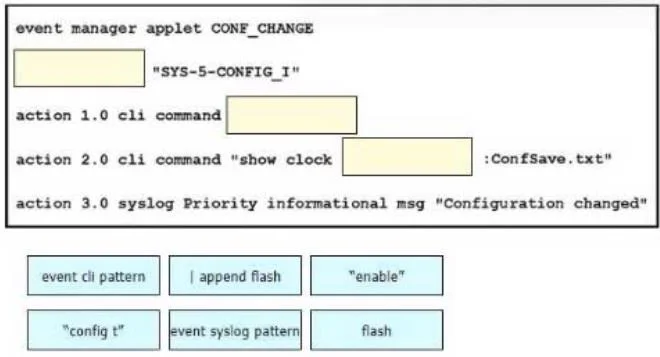
Answer Area
Drag items
Correct arrangement
- event syslog pattern
- enable
- | append flash
Explanation
The correct EEM script uses 'event syslog pattern' to detect configuration changes by monitoring syslog messages (such as %SYS-5-CONFIG_I), 'enable' to run the applet in privileged EXEC mode so it has the necessary permissions to write to flash, and '| append flash' to redirect and append the timestamped output to a file stored on the device's flash filesystem. Together these three elements create a functional EEM applet that triggers on config changes, executes with proper privileges, and stores the log entry persistently.
Topics
Community Discussion
No community discussion yet for this question.