
350-401 · Question #852
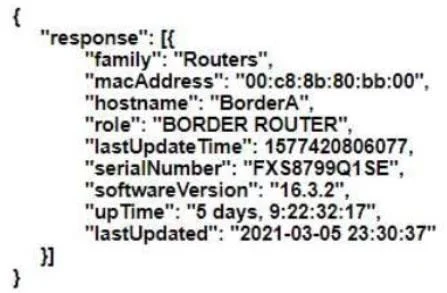
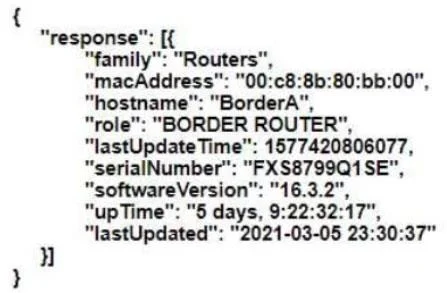
Based on the router's API output in JSON format below, which Python code will display the value of the "role" key? A. B. C. D.
The correct answer is B. json_data = response.json() print(json_data['response'][0]['role']). Option B is correct because response.json() is the proper Requests library method to parse a JSON response directly into a Python dictionary, and json_data['response'][0]['role'] correctly navigates the JSON structure where 'role' is a direct key within the first element of the…
Question
Based on the router's API output in JSON format below, which Python code will display the value of the "role" key? A. B. C. D.
Exhibits
Options
- Ajson_data = json.loads(response.text) print(json_data['response'][0]['family']['role'])
- Bjson_data = response.json() print(json_data['response'][0]['role'])
- Cjson_data = response.json() print(json_data['response'][0]['family']['role'])
- Djson_data = json.loads(response.text) print(json_data['response'][0]['role'])
How the community answered
(55 responses)- A7% (4)
- B75% (41)
- C15% (8)
- D4% (2)
Explanation
Option B is correct because response.json() is the proper Requests library method to parse a JSON response directly into a Python dictionary, and json_data['response'][0]['role'] correctly navigates the JSON structure where 'role' is a direct key within the first element of the 'response' list. The JSON structure shows 'role' at the top level of the response object, not nested inside a 'family' key.
Topics
Community Discussion
No community discussion yet for this question.