
350-401 · Question #798
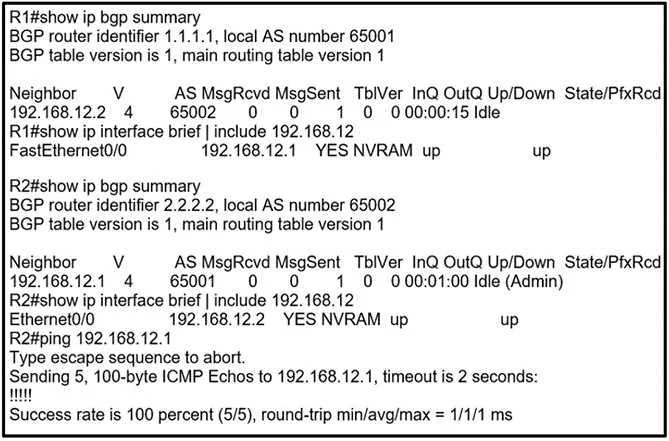
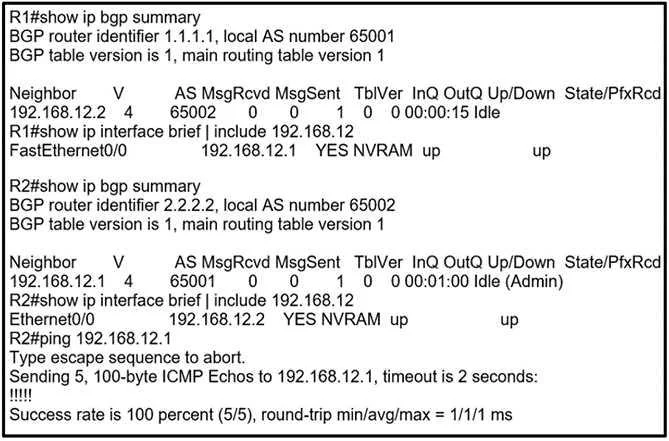
Refer to the exhibit. R1 and R2 are directly connected, but the BGP session does not establish. Which action must be taken to build an eBGP session?
The correct answer is D. Configure no neighbor 192.168.12.1 shutdown under R2 BGP process. If a BGP neighbor session is not establishing, it is often due to the neighbor being administratively shut down, which can be resolved by issuing the 'no neighbor shutdown' command.
Question
Refer to the exhibit. R1 and R2 are directly connected, but the BGP session does not establish. Which action must be taken to build an eBGP session?
Exhibits
Options
- AConfigure ip route 1.1.1.1 0.0.0.0 192.168.12.1 on R2.
- BConfigure neighbor 192.168.12.1 activate under R2 BGP process.
- CConfigure neighbor 2.2.2.2 remote-as 65002 under R1 BGP process.
- DConfigure no neighbor 192.168.12.1 shutdown under R2 BGP process.
How the community answered
(55 responses)- A4% (2)
- B7% (4)
- C13% (7)
- D76% (42)
Why each option
If a BGP neighbor session is not establishing, it is often due to the neighbor being administratively shut down, which can be resolved by issuing the 'no neighbor shutdown' command.
Configuring a static route for R1's loopback (1.1.1.1) via a directly connected interface (192.168.12.1) is generally not required for directly connected eBGP neighbors, as reachability is implicitly handled by the connected subnet.
The `activate` command is usually implicitly enabled for directly connected eBGP neighbors when the `neighbor remote-as` command is configured and is typically required only when peering over loopback interfaces with an `update-source` command.
Configuring `neighbor 2.2.2.2 remote-as 65002` under R1's BGP process would be a valid configuration step if R2's loopback is 2.2.2.2, but the question implies a specific missing action to build the session, and option D addresses an administrative shutdown state which is a more fundamental impediment.
If the BGP neighbor 192.168.12.1 is administratively shut down on R2, which is a common reason for a session not establishing, the `no neighbor 192.168.12.1 shutdown` command will reactivate the BGP peering process. This action allows the router to attempt to establish a BGP session with its neighbor.
Concept tested: BGP neighbor session troubleshooting (administrative state)
Source: https://www.cisco.com/c/en/us/support/docs/ip/border-gateway-protocol-bgp/13768-4.html
Topics
Community Discussion
No community discussion yet for this question.