
350-401 · Question #666
Drag and Drop Question Drag and drop the snippets onto the blanks within the code to construct a script that shows all logging that occurred on the appliance from Sunday until 9:00 p.m. Thursday…
The correct answer is 0 21 **-4; 3.0; ftp://cisco:[email protected]. The correct arrangement uses '0 21 **-4' to specify the cron-style time expression meaning 9:00 PM (21:00) on Thursday (day 4, where 0=Sunday), '3.0' as the logging version or severity level parameter capturing all logs from Sunday (day 0) through Thursday, and…
Question
Exhibits
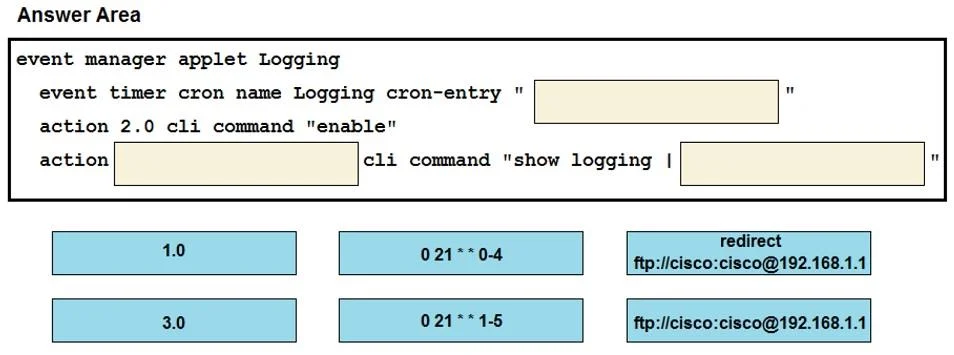
Answer Area
Drag items
Correct arrangement
- 0 21 **-4
- 3.0
- ftp://cisco:[email protected]
Explanation
The correct arrangement uses '0 21 **-4' to specify the cron-style time expression meaning 9:00 PM (21:00) on Thursday (day 4, where 0=Sunday), '3.0' as the logging version or severity level parameter capturing all logs from Sunday (day 0) through Thursday, and 'ftp://cisco:[email protected]' as the destination URL to retrieve or export the logs from the Cisco appliance. The '-4' in the time expression denotes 'up to and including Thursday' in the day-of-week range starting from Sunday, which aligns with the requirement of Sunday through 9:00 PM Thursday. Together these three snippets construct a valid script that queries the correct time window and log level from the correct source.
Topics
Community Discussion
No community discussion yet for this question.