
350-401 · Question #359
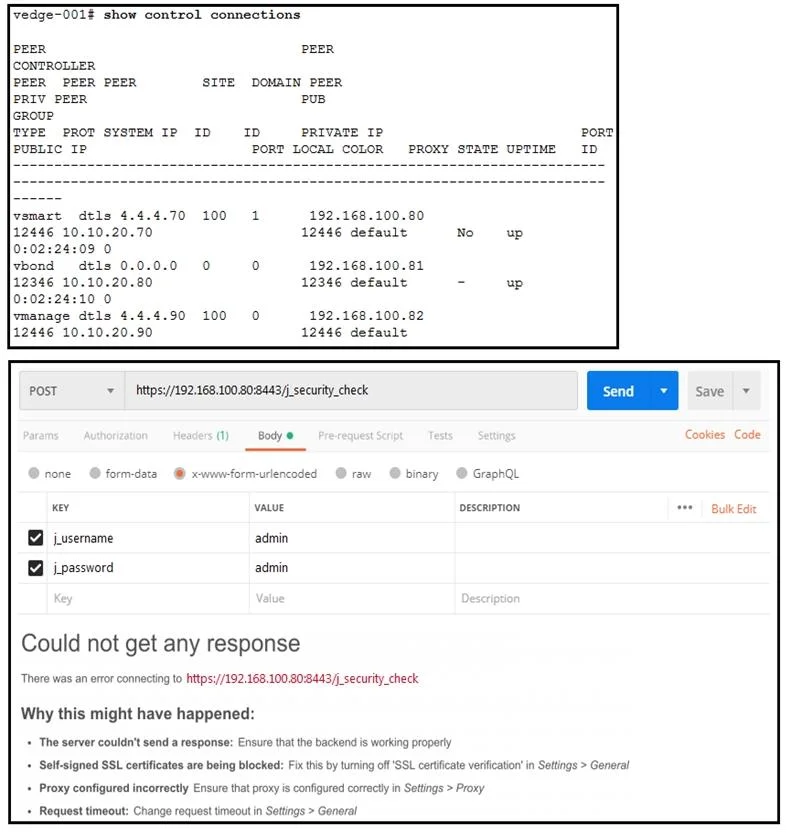
Refer to the exhibit. What step resolves the authentication issue?
The correct answer is C. target 192.168.100.82 in the URI. Explanation Option C is correct because the exhibit likely shows a URI targeting an incorrect IP address, and authentication failures in SD-WAN/vManage environments are often caused by the API request being directed to the wrong host - changing the URI to target 192.168.100.82…
Question
Exhibits
Options
- Ause basic authentication
- Bchange the port to 12446
- Ctarget 192.168.100.82 in the URI
- Drestart the vsmart host
How the community answered
(26 responses)- A4% (1)
- B8% (2)
- C77% (20)
- D12% (3)
Explanation
Explanation
Option C is correct because the exhibit likely shows a URI targeting an incorrect IP address, and authentication failures in SD-WAN/vManage environments are often caused by the API request being directed to the wrong host - changing the URI to target 192.168.100.82 (the correct vSmart or vManage IP) ensures the authentication request reaches the intended device and can be properly validated.
Why the distractors are wrong:
- Option A (basic authentication): The authentication method itself is not the issue; the problem stems from incorrect routing of the request, not the authentication type being used.
- Option B (change port to 12446): The standard Cisco SD-WAN management port is 8443 (or 443); 12446 is not a valid port for resolving this type of authentication issue.
- Option D (restart the vSmart host): Restarting the vSmart is an unnecessary and disruptive action when the root cause is simply an incorrect URI target, not a service failure.
Memory Tip: Think "Right address, right access" - authentication issues in API/URI-based environments almost always trace back to targeting the wrong endpoint. Always verify the IP in the URI before attempting more complex fixes like port changes or service restarts.
Topics
Community Discussion
No community discussion yet for this question.