
350-401 · Question #321
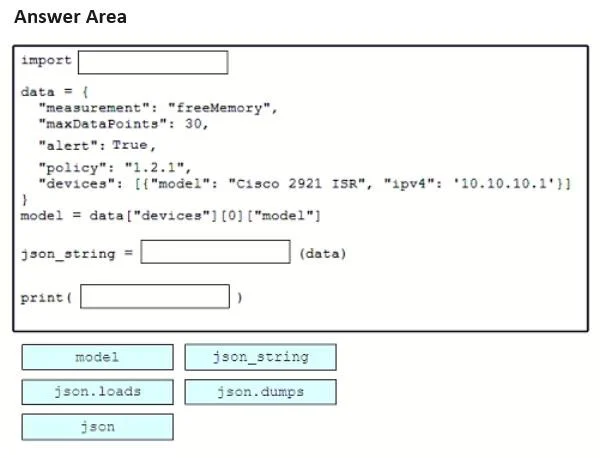
Drag and Drop Question Drag and drop the code snippets from the bottom onto the blanks in the script to convert a Python object into a JSON string. Not all options are used. Answer:
The correct answer is json; json.dumps; json_string. To convert a Python object into a JSON string, you must first import the 'json' module, then use 'json.dumps()' (dump to string) which serializes a Python object into a JSON-formatted string, and store the result in 'json_string'. The function 'json.dumps()' is specifically…
Question
Drag and Drop Question Drag and drop the code snippets from the bottom onto the blanks in the script to convert a Python object into a JSON string. Not all options are used. Answer:
Exhibit
Answer Area
Drag items
Correct arrangement
- json
- json.dumps
- json_string
Explanation
To convert a Python object into a JSON string, you must first import the 'json' module, then use 'json.dumps()' (dump to string) which serializes a Python object into a JSON-formatted string, and store the result in 'json_string'. The function 'json.dumps()' is specifically designed for encoding Python objects to JSON strings, making all three placements - import 'json', call 'json.dumps', and assign to 'json_string' - the correct sequence.
Topics
Community Discussion
No community discussion yet for this question.