
350-401 · Question #1321
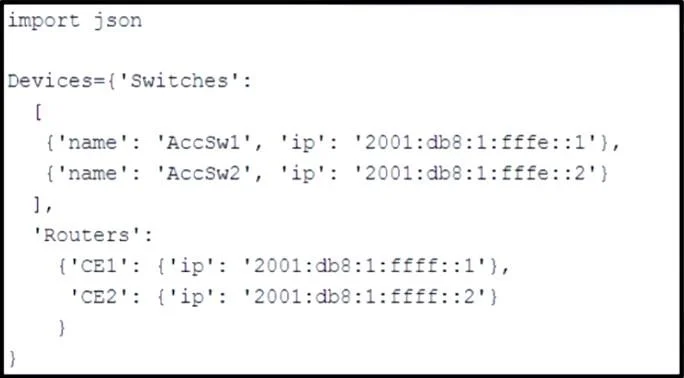
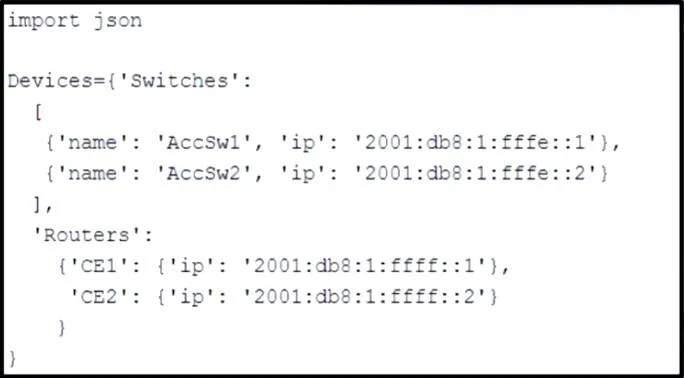
Refer to the exhibit. Which Python snippet stores the data structure of the device in JSON- formatted file? A. B. C. D.
The correct answer is B. OutFile = open("devices.json", "w") json.dump(Devices, OutFile) OutFile.close(). Option B is correct because it uses json.dump() which serializes the Python data structure (Devices) directly into a file object (OutFile), properly writing JSON-formatted content to 'devices.json'. The file is opened in write mode ('w'), the data is dumped using the correct…
Question
Exhibits
Options
- Awith open("devices.json", "w") as OutFile: Devices = json.load(OutFile)
- BOutFile = open("devices.json", "w") json.dump(Devices, OutFile) OutFile.close()
- Cwith open("devices.json", "w") as OutFile: json.dumps(Devices)
- DOutFile = open("devices.json", "w") OutFile.write(str(Devices)) OutFile.close()
How the community answered
(50 responses)- A2% (1)
- B92% (46)
- C2% (1)
- D4% (2)
Explanation
Option B is correct because it uses json.dump() which serializes the Python data structure (Devices) directly into a file object (OutFile), properly writing JSON-formatted content to 'devices.json'. The file is opened in write mode ('w'), the data is dumped using the correct function for file output, and the file is explicitly closed to ensure data is flushed and resources are released.
Topics
Community Discussion
No community discussion yet for this question.