
350-401 · Question #1298
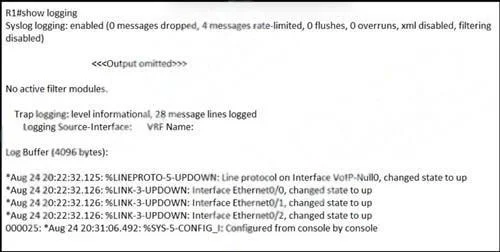
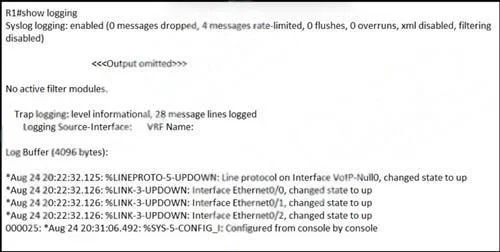
Refer to the exhibit. An engineer modified the logging configuration during the logging session. Which command was applied?
The correct answer is C. logging console 5. To change the logging level for console messages, the logging console <level> command is used, where <level> corresponds to the desired severity.
Question
Refer to the exhibit. An engineer modified the logging configuration during the logging session. Which command was applied?
Exhibits
Options
- Aservice timestamps debug uptime
- Bservice sequence-numbers
- Clogging console 5
- Dservice timestamps log uptime
How the community answered
(29 responses)- A3% (1)
- B17% (5)
- C69% (20)
- D10% (3)
Why each option
To change the logging level for console messages, the `logging console <level>` command is used, where `<level>` corresponds to the desired severity.
`service timestamps debug uptime` adds a timestamp showing uptime to debug messages but does not control the logging level to the console.
`service sequence-numbers` adds sequence numbers to debugging and logging messages but does not control the logging level to the console.
The `logging console <level>` command is used to set the severity level of messages that are displayed on the console. A level of 5 corresponds to 'notifications', directly modifying what is seen during the logging session on the console.
`service timestamps log uptime` adds a timestamp showing uptime to log messages but does not control the logging level to the console.
Concept tested: Cisco IOS logging console level
Source: https://www.cisco.com/c/en/us/td/docs/ios/12_4t/system/cmd/reference/sys_r/sr_s3.html#wp1026620
Topics
Community Discussion
No community discussion yet for this question.