
350-401 · Question #1233
Lab Simulation 15 Guidelines This is a lab item in which tasks will be performed on virtual devices. - Refer to the Tasks tab to view the tasks for this lab item. - Refer to the Topology tab to…
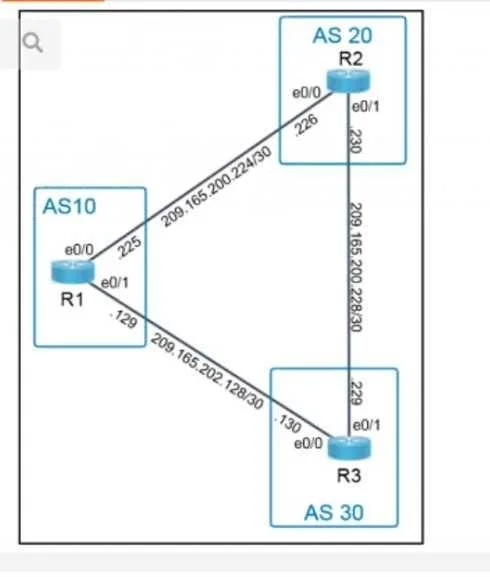
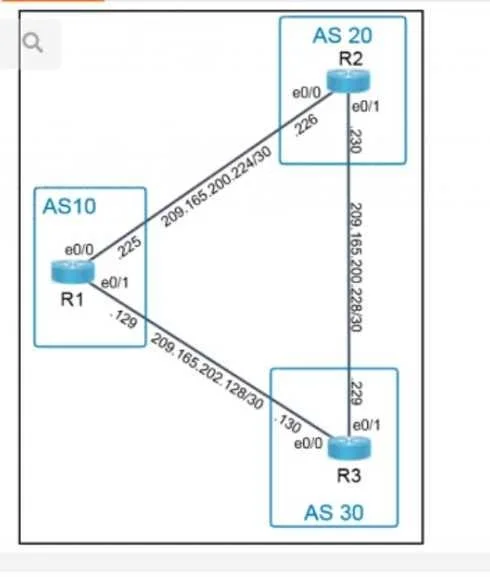
BGP Lab Simulation Explanation Overall Goal This lab configures eBGP (external BGP) on R1 (AS 10) to peer with two external autonomous systems (AS 20 and AS 30) and advertise three of R1's directly connected networks. The address-family structure is used, which is the modern…
Question
Exhibits
Explanation
BGP Lab Simulation Explanation
Overall Goal
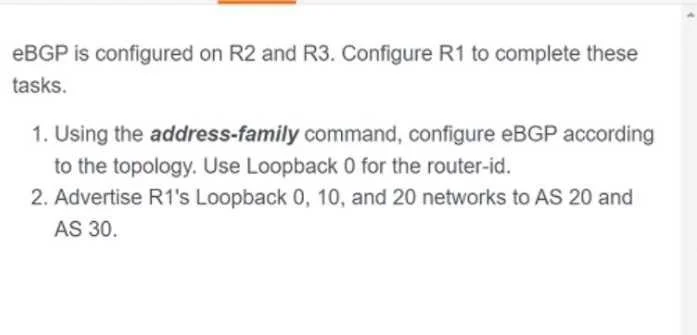
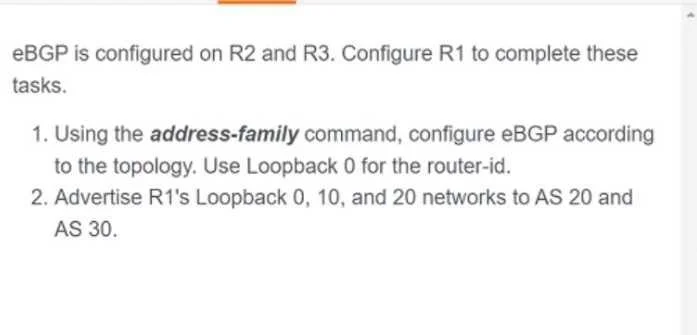
This lab configures eBGP (external BGP) on R1 (AS 10) to peer with two external autonomous systems (AS 20 and AS 30) and advertise three of R1's directly connected networks. The address-family structure is used, which is the modern, modular approach to BGP - it separates neighbor relationships from address-family-specific activation and network advertisement.
Note: There are discrepancies between the "Answer" and "Procedure" sections (different IPs/networks). The explanation below follows the Procedure as written, which aligns with the stated task goals.
Step-by-Step Breakdown
Step 1: router bgp 10
Enters BGP configuration mode and assigns R1 to AS 10. This is the foundation - BGP will not function without declaring which AS this router belongs to. Must be done first; all subsequent BGP commands depend on this context.
Step 2: no bgp default ipv4-unicast
By default, Cisco IOS automatically activates all BGP neighbors under IPv4 unicast. This command disables that behavior, forcing you to explicitly activate neighbors within an address-family.
Why this matters: Without this command, neighbors get activated globally before you configure the address-family block, which can cause unintended advertisements and makes the config less explicit. This is required when using the address-family approach.
If skipped: Neighbors may auto-activate before address-family configuration is applied, potentially advertising unwanted routes or creating inconsistent behavior.
Step 3: bgp router-id 10.1.1.1
Manually sets the BGP router ID to the Loopback 0 IP address (as the task requires). The router ID is a 32-bit identifier used to distinguish this router in BGP.
Why Loopback 0? Loopback interfaces are always up - they never go down due to physical link failure. Using a loopback for the router ID ensures BGP stability.
If skipped: IOS will auto-select the highest IP address on an active interface, which may not be Loopback 0. This could fail the task requirement and produce unpredictable behavior.
Step 4: neighbor 209.165.200.226 remote-as 20
Defines the first eBGP neighbor (in AS 20) at IP 209.165.200.226. This establishes the peer relationship at the BGP process level.
eBGP indicator: remote-as 20 differs from R1's own AS (10), so this is automatically treated as eBGP.
Step 5: neighbor 209.165.202.130 remote-as 30
Defines the second eBGP neighbor (in AS 30). Same logic as Step 4.
If Steps 4-5 are skipped: No neighbors exist to activate in the address-family block - Steps 10-11 would fail.
Step 6: address-family ipv4
Enters the IPv4 unicast address-family configuration mode. This is where you specify which networks to advertise and which neighbors to activate for IPv4.
Why necessary: Because Step 2 disabled auto-activation, you must explicitly configure everything within this block. Network advertisements and neighbor activation only take effect here.
Step 7: network 1.1.1.10 mask 255.255.255.255
Advertises R1's Loopback 0 network into BGP. The /32 mask (255.255.255.255) advertises exactly this host route.
Requirement: This network must exist in R1's routing table (as a connected or static route) for BGP to advertise it. If the route isn't in the table, BGP silently ignores the network statement.
Step 8: network 209.165.201.0 mask 255.255.255.255
Advertises R1's Loopback 10 network (or a connected interface network). Same /32 or exact-match mask requirement applies.
Step 9: network 209.165.202.10 mask 255.255.255.255
Advertises R1's Loopback 20 network. Together, Steps 7-9 fulfill the task requirement to "advertise R1's Loopback 0, 10, and 20 networks."
If any network step is skipped: That prefix will not be sent to AS 20 or AS 30, failing the advertisement requirement.
Step 10: neighbor 209.165.200.226 activate
Activates the AS 20 neighbor within the IPv4 address-family. Without this, the neighbor is defined globally (Steps 4-5) but will not exchange IPv4 routes.
Step 11: neighbor 209.165.202.130 activate
Same as Step 10, for the AS 30 neighbor.
If Steps 10-11 are skipped: Neighbors will establish a TCP session but no routes will be exchanged - BGP peering won't actually work for IPv4.
Step 12: wr (write memory)
Saves the running configuration to NVRAM. Without this, the configuration is lost on reload.
The lab explicitly requires this before moving to the next item.
What Goes Wrong If Order Is Violated
| Skipped/Reordered Step | Consequence |
|---|---|
| Skip Step 2 | Neighbors auto-activate without explicit address-family control |
| Step 3 after neighbors form | Router ID may already be negotiated incorrectly |
| Steps 10-11 before Step 6 | Commands fail - not in address-family context yet |
| Skip Step 12 | Config lost on reload; lab grading may fail |
Memory Tip
Think of it in three phases:
- Process setup (Steps 1-3): Who am I? - AS number, disable defaults, set router ID
- Neighbor declaration (Steps 4-5): Who do I talk to? - define peers globally
- Address-family block (Steps 6-11): What do I advertise and to whom? - networks + activate neighbors
The address-family ipv4 block is a "contract" - you declare networks to share, then sign the contract with each neighbor via activate.
Topics
Community Discussion
No community discussion yet for this question.