
350-401 · Question #1188
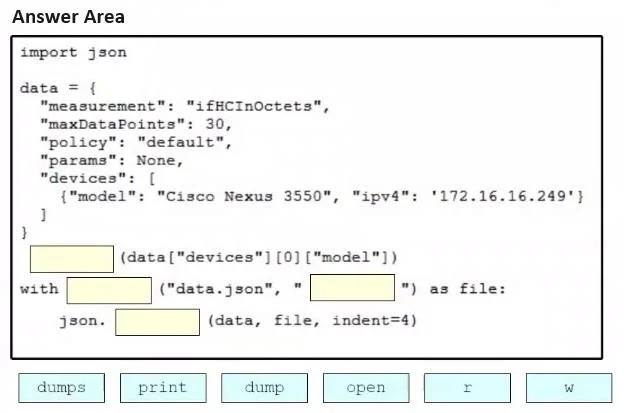
Drag and Drop Question Drag and drop the code snippets from the bottom onto the blanks in the Python script to print the device model to the screen and write JSON data to a file. Not all options are…
The correct answer is print; open; w; dump. The correct sequence uses 'print' to display the device model to the screen, 'open' to create/access a file, 'w' as the write mode argument to open the file for writing, and 'dump' to serialize and write JSON data directly to a file object. The json.dump() function writes JSON…
Question
Drag and Drop Question Drag and drop the code snippets from the bottom onto the blanks in the Python script to print the device model to the screen and write JSON data to a file. Not all options are used. Answer:
Exhibit
Answer Area
Drag items
Correct arrangement
- open
- w
- dump
Explanation
The correct sequence uses 'print' to display the device model to the screen, 'open' to create/access a file, 'w' as the write mode argument to open the file for writing, and 'dump' to serialize and write JSON data directly to a file object. The json.dump() function writes JSON to a file object, while json.dumps() only converts to a string without writing to a file, making 'dump' the correct choice for file output.
Topics
Community Discussion
No community discussion yet for this question.