
350-401 · Question #1186
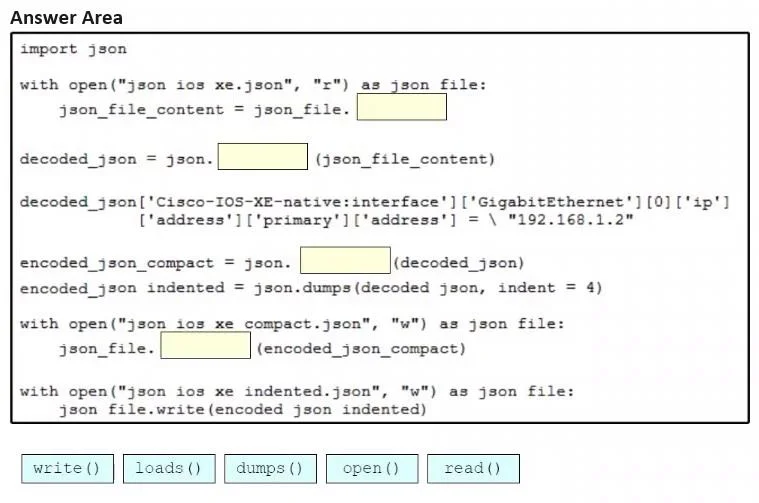
Drag and Drop Question Drag and drop the code snippets from the bottom onto blanks in the Python script so that the program changes the IP address and saves it as a new JSON file on the disk. Not…
The correct answer is read(); loads(); dumps(); write(). The correct sequence follows the standard read-parse-serialize-write workflow for JSON file manipulation in Python. First, read() retrieves the raw string content from the opened file, then loads() parses that JSON string into a Python dictionary (allowing IP address…
Question
Drag and Drop Question Drag and drop the code snippets from the bottom onto blanks in the Python script so that the program changes the IP address and saves it as a new JSON file on the disk. Not all options are used. Answer:
Exhibit
Answer Area
Drag items
Correct arrangement
- read()
- loads()
- dumps()
- write()
Explanation
The correct sequence follows the standard read-parse-serialize-write workflow for JSON file manipulation in Python. First, read() retrieves the raw string content from the opened file, then loads() parses that JSON string into a Python dictionary (allowing IP address modification), then dumps() serializes the modified dictionary back into a JSON-formatted string, and finally write() saves that string to the new output file.
Topics
Community Discussion
No community discussion yet for this question.