nerdexam
Cisco

350-401 · Question #1116

Lab Simulation 13 Guidelines This is a lab item in which tasks will be performed on virtual devices. - Refer to the Tasks tab to view the tasks for this lab item. - Refer to the Topology tab to access

To configure eBGP on R2 with Loopback 0 as the router-id without using the address-family command, you use 'router bgp <AS>' followed by 'bgp router-id <loopback0-IP>' and then advertise networks using the 'network' statement with appropriate mask parameters directly under the BG

Submitted by lars.no· Mar 6, 2026Configure and verify eBGP between directly connected neighbors, including router-id assignment and prefix advertisement without using address-family commands - aligns with Cisco ENCOR (350-401) or CCNP routing domain covering BGP fundamentals and neighbor relationships.

Question

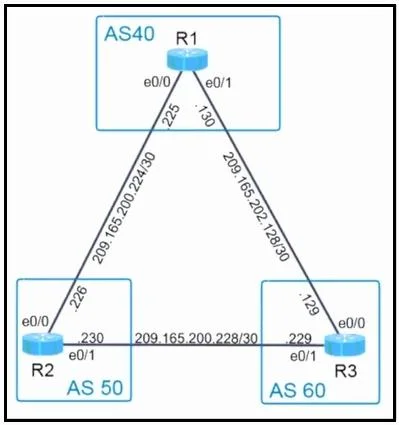
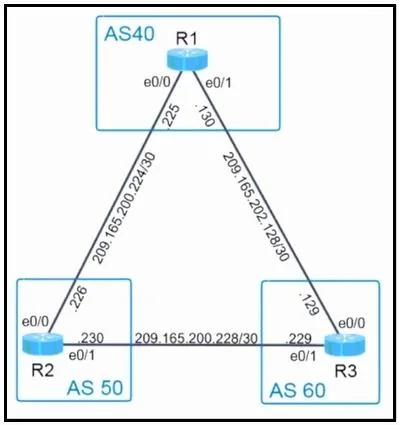
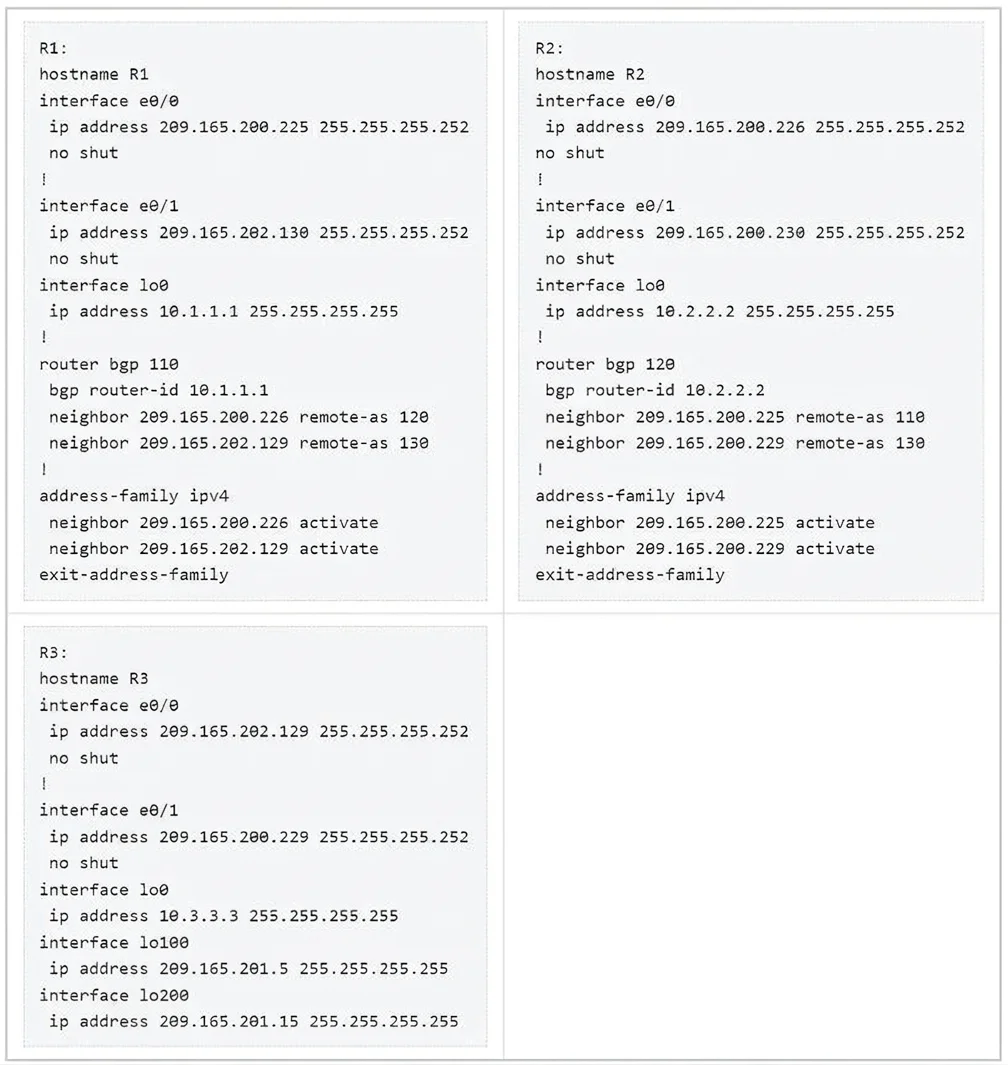
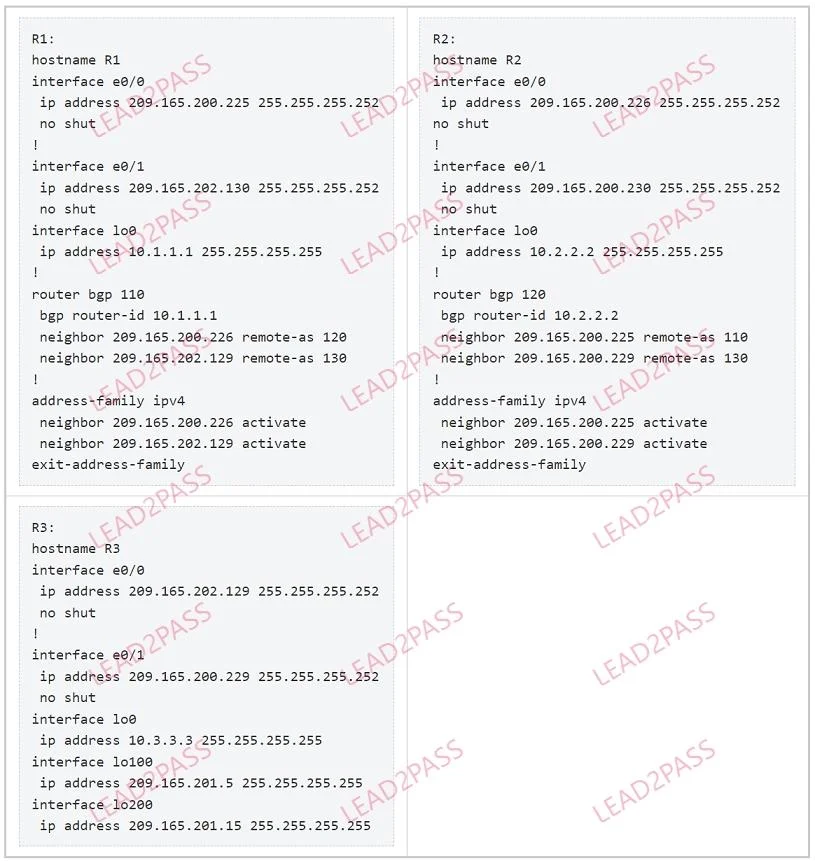
Lab Simulation 13 Guidelines This is a lab item in which tasks will be performed on virtual devices. - Refer to the Tasks tab to view the tasks for this lab item. - Refer to the Topology tab to access the device console(s) and perform the tasks. - Console access is available for all required devices by clicking the device icon or using the tab(s) above the console window. - All necessary preconfigurations have been applied. - Do not change the enable password or hostname for any device. - Save your configurations to NVRAM before moving to the next item. - Click Next at the bottom of the screen to submit this lab and move to the next question. - When Next is clicked, the lab closes and cannot be reopened. Topology Tasks Configure R2 according to the topology to achieve these results: 1. Configure eBGP using Loopback 0 for the router-id. Do not use the address-family command to accomplish this. 2. Advertise R2's Loopback 100 and Loopback 200 networks to AS40 and AS60. Initial Configs Answer: Note: There are some variations of this sim. It may require to configure R1 or R2 instead of R3. Please also check the AS numbers carefully as they may be different. Task 1. Configure eBGP using Loopback 0 for the router-id. Do not use the address-family command to accomplish this. Please check the IP address of the Loopback0 interface with the command "show ip int brief". Suppose it is 10.3.3.3 in this case. R3: router bgp 130 bgp router-id 10.3.3.3 neighbor 209.165.202.130 remote-as 110 neighbor 209.165.200.230 remote-as 120 Task 2. Advertise R3's Loopback 100 and Loopback 200 networks to AS110 and AS120. Please check the IP addresses and subnet masks of Lo100 (209.165.203.1/32) & Lo200 (200.200.203.2/32) interfaces carefully to match with the "network" commands below (with "show run" command). Suppose in this case the subnet masks of Lo100 & Lo200 IPs both are /32: R3 (under "router bgp 130"): network 209.165.201.5 mask 255.255.255.255 network 209.165.201.15 mask 255.255.255.255 Note: If you cannot configure two "network" commands above directly under "router bgp 130" then you should use the "address-family ipv4" command first. It seems new IOS versions only allow to configure "network" command under "address-family ipv4" mode. Verification Check on R1, R2 to see if they have the IP addresses of Lo100 & Lo200 interfaces of R3 in their routing table with the "show ip route bgp" (or "show ip route" or "show ip bgp") command. -> If the "State/PfxRcd" field has a number then BGP relationship is up. R1#show ip route bgp --output omitted-- 209.165.201.0/32 is subnetted, 2 subnets B 209.165.201.5 [20/0] via 209.165.202.129, 00:00:01 B 209.165.201.15 [20/0] via 209.165.202.129, 00:00:01 Save the configuration R3#copy running-config startup-config

Exhibits

350-401 question #1116 exhibit 1
350-401 question #1116 exhibit 2
350-401 question #1116 exhibit 3
350-401 question #1116 exhibit 4

Explanation

To configure eBGP on R2 with Loopback 0 as the router-id without using the address-family command, you use 'router bgp <AS>' followed by 'bgp router-id <loopback0-IP>' and then advertise networks using the 'network' statement with appropriate mask parameters directly under the BGP process. The 'bgp router-id' command explicitly sets the router-id to the Loopback 0 address, ensuring BGP stability and predictability. Networks for Loopback 100 and Loopback 200 are advertised using 'network <prefix> mask <subnet-mask>' commands, which inject those prefixes into the BGP table and propagate them to both eBGP neighbors in AS40 and AS60.

Topics

#eBGP Configuration#BGP Router-ID#BGP Network Advertisement#Loopback Interfaces

Community Discussion

No community discussion yet for this question.

Full 350-401 Practice