
350-001 · Question #37
Refer to the exhibit. A small enterprise connects its office to two ISPs, Using Separate T1 links. A Static Route is used for the default Route, Pointing to both interfaces with a different…
The correct answer is B. Use a track object with an IP SLA probe for the static route on L2P-R1. D. Use a routing protocol between L2P-R1 and the upstream ISP. Interface Tracking Interface tracking allows you to specify another interface on the router for the HSRP process to monitor in order to alter the HSRP priority for a given group. If the specified interface's line protocol goes down, the HSRP priority of this router is reduced…
Question
Refer to the exhibit. A small enterprise connects its office to two ISPs, Using Separate T1 links. A Static Route is used for the default Route, Pointing to both interfaces with a different Administrative distance, So that one of the default router is preferred. Recently the primary link has been upgraded to a new 10 MB/S ethernet link After a Few Weeks, they experinced a failure. the link didn't pass traffic, but the primary static route remained active. they lost their internet connectivity, even though the backup link was operating. Which two possible solutions can be implemented to avoid this situation in the future? (Choose two)
Exhibit
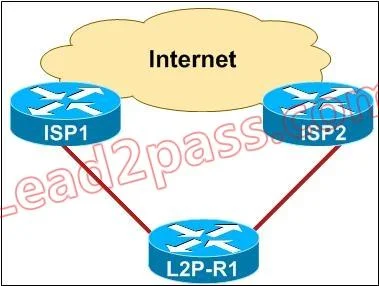
Options
- AImplement HSRP link tracking on the branch router L2P-R1
- BUse a track object with an IP SLA probe for the static route on L2P-R1.
- CTrack the link state of the ethernet link using a track object on L2P-R1
- DUse a routing protocol between L2P-R1 and the upstream ISP
How the community answered
(23 responses)- A17% (4)
- B48% (11)
- C35% (8)
Explanation
Interface Tracking Interface tracking allows you to specify another interface on the router for the HSRP process to monitor in order to alter the HSRP priority for a given group. If the specified interface's line protocol goes down, the HSRP priority of this router is reduced, allowing another HSRP router with higher priority can become active (if it has preemption enabled). To configure HSRP interface tracking, use the standby [group] track interface [priority] command. When multiple tracked interfaces are down, the priority is reduced by a cumulative amount. If you explicitly set the decrement value, then the value is decreased by that amount if that interface is down, and decrements are cumulative. If you do not set an explicit decrement value, then the value is decreased by 10 for each interface that goes down, and decrements are cumulative. The following example uses the following configuration, with the default decrement value of 10. Note: When an HSRP group number is not specified, the default group number is group 0. interface ethernet0 ip address 10.1.1.1 255.255.255.0 standby ip 10.1.1.3 standby priority 110 standby track serial0 standby track serial1 The HSRP behavior with this configuration is: 0 interfaces down = no decrease (priority is 110) 1 interface down = decrease by 10 (priority becomes100) 2 interfaces down = decrease by 10 (priority becomes 90)
Topics
Community Discussion
No community discussion yet for this question.