
Avaya
3302 · Question #32
A customer is installing a new Avaya Contact Center Control Manager (ACCCM) server on a Windows 2008 server and has logged in with a Domain Account- During installation the customer receives the…
The correct answer is A. Right click on the ACCCM <release>.exe (example: ACCCM 6.3.l.exe) and select"run as administrator". See the full explanation below for the reasoning.
Question
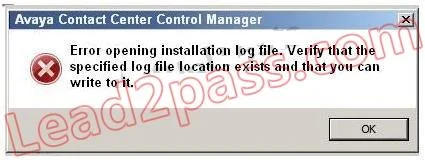
A customer is installing a new Avaya Contact Center Control Manager (ACCCM) server on a Windows 2008 server and has logged in with a Domain Account- During installation the customer receives the message in the exhibit. How can this error be resolved?
Exhibit
Options
- ARight click on the ACCCM <release>.exe (example: ACCCM 6.3.l.exe) and select"run as administrator".
- BRight click on the ACCCM <release>.exe and change permissions to full control for the logged in user.
- CGive the logged in user full control of the C:\ directory.
- DGive the logged in user full control of the C:\temp directory.
How the community answered
(55 responses)- A78% (43)
- B11% (6)
- C4% (2)
- D7% (4)
Community Discussion
No community discussion yet for this question.