
312-50V11 · Question #185
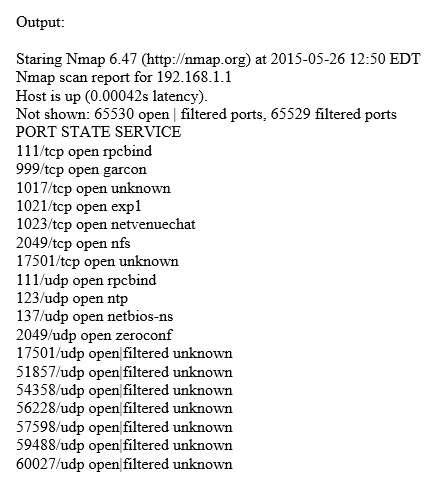
Which of the following Nmap commands will produce the following output?
The correct answer is C. nmap -sS -sU -Pn -p 1-65535 192.168.1.1. The nmap -sS -sU -Pn -p 1-65535 command performs a full TCP SYN scan and UDP scan across all ports with ping disabled, which is necessary to produce output showing both TCP and UDP results for the entire port range.
Question
Which of the following Nmap commands will produce the following output?
Exhibit
Options
- Anmap -sT -sX -Pn -p 1-65535 192.168.1.1
- Bnmap -sN -Ps -T4 192.168.1.1
- Cnmap -sS -sU -Pn -p 1-65535 192.168.1.1
- Dnmap -sS -Pn 192.168.1.1
How the community answered
(45 responses)- A9% (4)
- B2% (1)
- C84% (38)
- D4% (2)
Why each option
The nmap -sS -sU -Pn -p 1-65535 command performs a full TCP SYN scan and UDP scan across all ports with ping disabled, which is necessary to produce output showing both TCP and UDP results for the entire port range.
The -sT (TCP connect) and -sX (Xmas) scan flags cannot be used together in the same command, and neither performs a UDP scan, so this would not produce combined TCP/UDP port output.
The -sN (Null scan) only tests TCP ports and -Ps specifies a ping method rather than a scan type, and with default ports only, this would not produce full-range TCP and UDP output.
The flags -sS and -sU instruct Nmap to run a TCP SYN (half-open) scan and a UDP scan simultaneously. The -Pn flag skips host discovery (treats the host as up), and -p 1-65535 scans every possible port. This combination produces comprehensive output covering all TCP and UDP ports, which matches the described output format.
Using only -sS performs a TCP SYN scan on default ports only - it omits UDP scanning and the full port range, so the output would be incomplete.
Concept tested: Nmap TCP SYN and UDP full port range scanning
Source: https://nmap.org/book/man-port-scanning-techniques.html
Topics
Community Discussion
No community discussion yet for this question.