
3100 · Question #43
A remote user Avaya softphone to work from home reports that the client desktop application will not register. After verifying that the user has configured the softphone application to "point" to…
The correct answer is A. Change the IP SoftPhone field to y. See the full explanation below for the reasoning.
Question
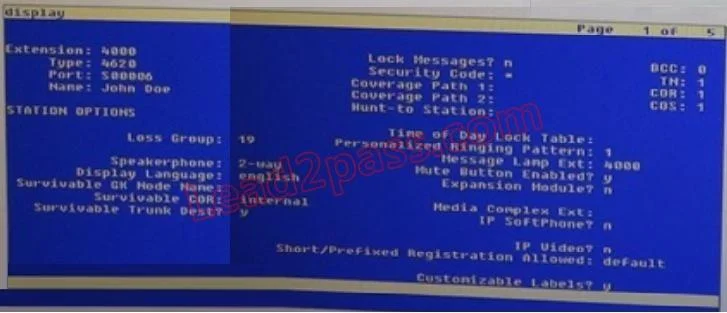
A remote user Avaya softphone to work from home reports that the client desktop application will not register. After verifying that the user has configured the softphone application to "point" to the current IP address of a Communication Manager Gatekeeper using an administered extension, you ask if the user supplied a password when logging on. The user confirms that the password was used on each log-on attempt. You look up the user's information and note that the type field is 4620 (IP telephone) and the security code field is. With reference to the scenario described in the exhibit, which action should you take to ensure that the user can use the IP SoftPhone?
Exhibit
Options
- AChange the IP SoftPhone field to y.
- BChange the Converge Path 1 value to match the value in converge path 2.
- CChange the message Lamp Ext value to match the extension number.
- DChange the name in the name field to match the name as administered in the LDAP directory.
How the community answered
(48 responses)- A77% (37)
- B6% (3)
- C13% (6)
- D4% (2)
Community Discussion
No community discussion yet for this question.