
F5
303 · Question #356
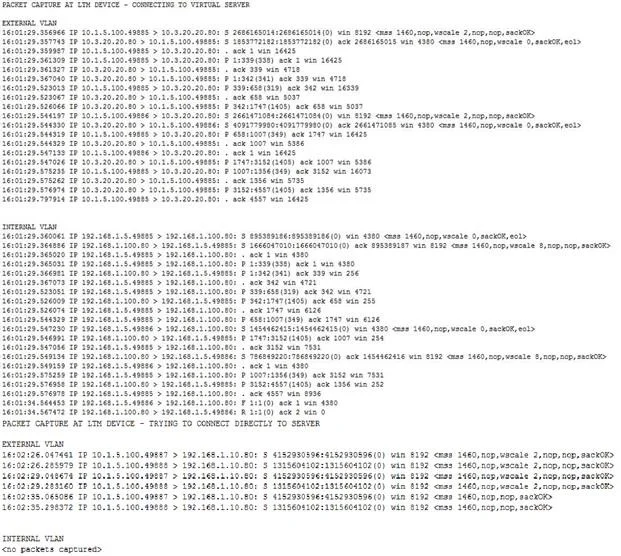
Refer to the exhibits. Users are able to access the application when connecting to the virtual server but are unsuccessful when connecting directly to the application servers. The LTM Specialist…
The correct answer is D. Configure an IP Forwarding virtual server on the LTM device. See the full explanation below for the reasoning.
Question
Refer to the exhibits. Users are able to access the application when connecting to the virtual server but are unsuccessful when connecting directly to the application servers. The LTM Specialist wants to allow direct access to the application servers. Which configuration change resolves this problem?
Exhibit
Options
- AEnable port 443 on the virtual server.
- BConfigure a SNAT pool on the LTM device.
- CDisable address translation on the virtual server.
- DConfigure an IP Forwarding virtual server on the LTM device.
- EConfigure a route to the web server subnet on the network router.
How the community answered
(37 responses)- A3% (1)
- B11% (4)
- D81% (30)
- E5% (2)
Community Discussion
No community discussion yet for this question.