
300-915 · Question #4
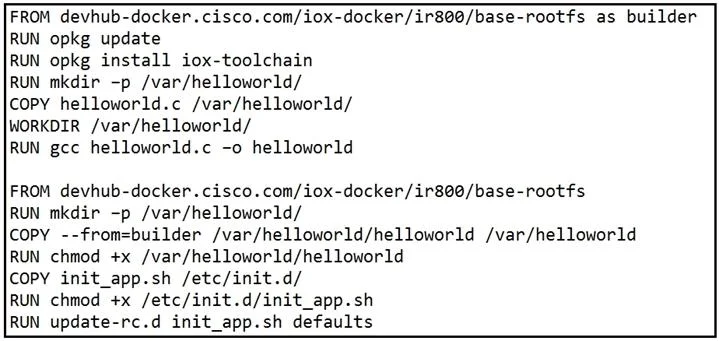
Refer to the exhibit. When a Docker image is built using this Dockerfile, which two statements are valid on Cisco IOx 1.8 and before? (Choose two.)
The correct answer is B. It builds a Docker image that cannot be used directly on Cisco IOx. C. It compiles a "hello world" program in C. Options B and C are correct because the Dockerfile compiles a C "hello world" program (likely using a multi-stage build with gcc), and on Cisco IOx 1.8 and earlier, raw Docker images cannot be deployed directly - they must first be converted into an IOx application package…
Question
Refer to the exhibit. When a Docker image is built using this Dockerfile, which two statements are valid on Cisco IOx 1.8 and before? (Choose two.)
Exhibit
Options
- AIt builds an image that can be executed on all Cisco platforms.
- BIt builds a Docker image that cannot be used directly on Cisco IOx.
- CIt compiles a "hello world" program in C.
- DIt creates two separate images.
- EIt builds an IOx package that can be deployed directly.
How the community answered
(24 responses)- A8% (2)
- B71% (17)
- D4% (1)
- E17% (4)
Explanation
Options B and C are correct because the Dockerfile compiles a C "hello world" program (likely using a multi-stage build with gcc), and on Cisco IOx 1.8 and earlier, raw Docker images cannot be deployed directly - they must first be converted into an IOx application package using a tool like ioxclient, which produces a .tar package suitable for the platform.
Option A is wrong because Docker images are architecture-specific (e.g., x86_64 vs. ARM); a single image will not run on all Cisco platforms. Option D is wrong because multi-stage Dockerfiles produce one final image - intermediate build stages are discarded, not saved as separate images. Option E is wrong because the output of docker build is a Docker image, not an IOx package; the extra packaging step (via ioxclient) is what would make it deployable, and that step is absent here.
Memory tip: Think of IOx 1.8 as "bring your own wrapper" - Docker gives you the image, but Cisco IOx 1.8 and before refuse to open the box until you re-wrap it as an IOx package. Only newer IOx versions support native Docker deployment directly.
Topics
Community Discussion
No community discussion yet for this question.