
300-910 · Question #96
Portion of Console Output > git rev-parse refs/remotes/origin/master^{commit} # timeout=10 Checking out Revision 6521bbbe762b1921fe562556d55075591d0fd (refs/remotes/ origin/master) > git config…
The correct answer is A. Pip installation on the system that runs Jenkins is missing. The console output pip: command not found indicates that the pip executable is not available in the system's PATH environment variable where the Jenkins job is trying to execute it.
Question
git rev-parse refs/remotes/origin/master^{commit} # timeout=10 Checking out Revision 6521bbbe762b1921fe562556d55075591d0fd (refs/remotes/ origin/master) git config core.sparsecheckout # timeout=10 git checkout -f 6521bbbe762b1921fe56256d55075591d0fd # timeout=10 Commit message: "requirements" git rev-list --no-walk e9773fad8d6b6255d431d32212ea666a153472 # timeout=10 [test] $ /bin/sh -xe /var/folders/pg/_9bhy6jxdzpzslsxn877h0000gn/T/ jenkins2526147286436512363.sh
- cd backend
- pip install -r requirements.txt /var/folders/pg/_9bhy6jxdzpzslsxn877h0000gn/T/jenkins2526147286436512363.sh: line 3: pip: command not found Build step 'Execute shell' marked build as failure Finished: FAILURE
Exhibit
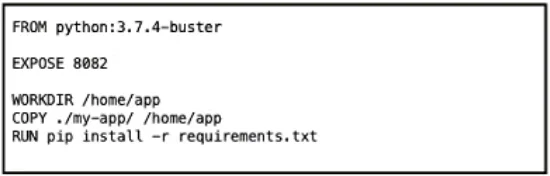
Options
- APip installation on the system that runs Jenkins is missing.
- BPython libraries are installed by using pip.
- CJenkins pip plugin installation is missing.
- DThe requirements.txt file is located in the wrong folder.
How the community answered
(42 responses)- A86% (36)
- B2% (1)
- C7% (3)
- D5% (2)
Why each option
The console output `pip: command not found` indicates that the `pip` executable is not available in the system's PATH environment variable where the Jenkins job is trying to execute it.
The error message 'pip: command not found' directly signifies that the `pip` executable, which is Python's package installer, is either not installed on the build agent system or its location is not included in the system's PATH environment variable. This prevents the shell script executed by Jenkins from invoking `pip` successfully.
This statement describes a characteristic of Python package management but does not identify the specific problem, which is the absence or inaccessibility of the `pip` command itself.
Jenkins does not typically rely on a dedicated 'pip plugin' to execute standard shell commands like `pip install`. The problem lies with the underlying operating system environment of the Jenkins agent, not a missing Jenkins plugin.
If the `requirements.txt` file were in the wrong folder, the error message would typically indicate a 'file not found' issue, not that the `pip` command itself is missing.
Concept tested: Jenkins build agent environment setup
Topics
Community Discussion
No community discussion yet for this question.