
300-835 · Question #66
Refer to the exhibit. Drag and drop the code snippets from the bottom onto the blanks in the Python script to monitor how many people are in Room 70 by using xAPI and RoomAnalytics. Not all options…
The question is missing both the exhibit (the Python script with blanks) and the actual code snippet options - the {} indicates the options object is empty. Without those, I can't tell you which snippet goes in which blank. However, I can explain the concept and typical…
Question
Exhibit
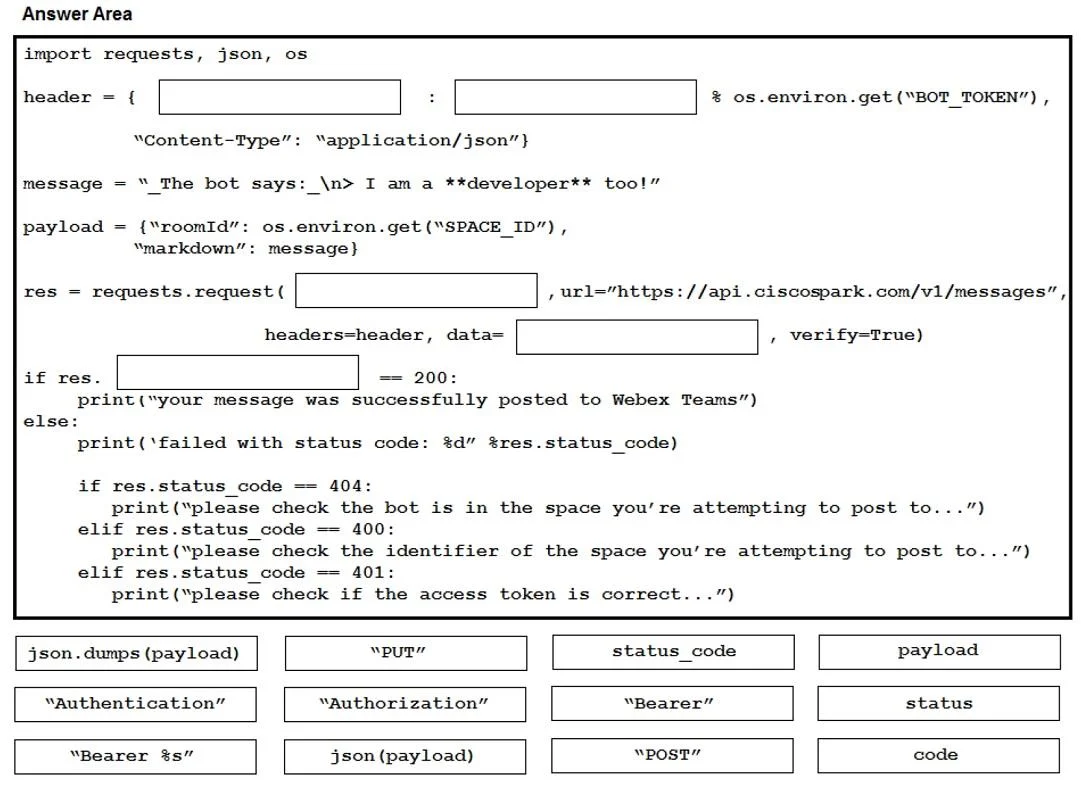
Explanation
The question is missing both the exhibit (the Python script with blanks) and the actual code snippet options - the {} indicates the options object is empty.
Without those, I can't tell you which snippet goes in which blank. However, I can explain the concept and typical structure of this type of script so you understand what to expect.
Overall Goal
The script connects to a Cisco Webex Room device (e.g., a Board or Codec in Room 70) via xAPI and reads the RoomAnalytics.PeopleCount.Current status to report how many people are in the room.
Typical Script Structure & Why Each Part Matters
1. Import libraries
import requests
You need an HTTP client to communicate with the device's REST API. Skipping this causes an immediate NameError.
2. Define device credentials and IP
ip = "10.10.x.x"
username = "admin"
password = "password"
xAPI requires basic authentication. Without valid credentials, the device returns 401 Unauthorized.
3. Build the xAPI URL for status query
url = f"https://{ip}/getxml?location=/Status/RoomAnalytics/PeopleCount"
This is the specific xAPI REST endpoint that returns the current occupancy count. The path RoomAnalytics/PeopleCount is the exact xAPI status node - using a wrong path returns an empty or error response.
4. Send the GET request with auth and SSL bypass
response = requests.get(url, auth=(username, password), verify=False)
verify=False bypasses self-signed certificate errors common on lab devices. Without auth=, the request is rejected.
5. Parse the XML response
The device responds in XML. You'd parse it (e.g., with xml.etree.ElementTree) to extract the integer value inside <PeopleCount><Current>.
6. Print the result
print(f"People in Room 70: {count}")
What Goes Wrong If Steps Are Skipped
| Skipped Step | Result |
|---|---|
| No credentials | 401 Unauthorized |
| Wrong xAPI path | Empty/error XML |
| No XML parsing | Raw string, not a usable number |
No verify=False | SSLError on self-signed cert |
Memory Tip
Think: "Connect → Query → Parse → Report" - same pattern as any REST monitoring script, just with Cisco's xAPI XML dialect instead of JSON.
To get a complete answer, re-share the question with the exhibit image and the populated options list.
Topics
Community Discussion
No community discussion yet for this question.