
300-820 · Question #98
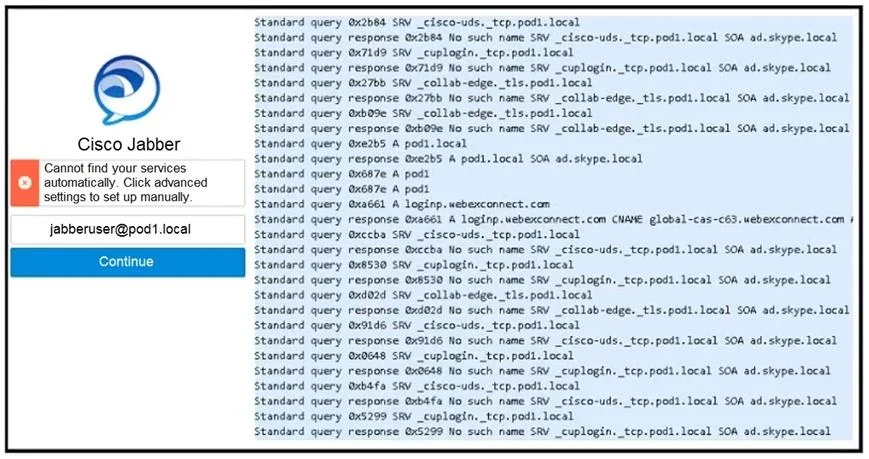
Refer to the exhibit. The administrator attempted to log in, but Jabber clients cannot log in via mobile and remote access. How is this issue resolved?
The correct answer is C. A DNS SRV record must be created for _collab-edge._tls.pod1.local that points to the. For Jabber to discover and connect to the Expressway-E when operating outside the corporate network (MRA), it relies on a specific DNS SRV record: _collab-edge._tls.<domain>. This record resolves to the FQDN of the Expressway-E and tells Jabber where to establish a secure TLS…
Question
Refer to the exhibit. The administrator attempted to log in, but Jabber clients cannot log in via mobile and remote access. How is this issue resolved?
Exhibit
Options
- ASkype for Business mode must be disabled on the DNS server because it conflicts with Jabber
- BThe domain pod1.local must be deprovisioned from the Webex cloud for Jabber logins.
- CA DNS SRV record must be created for _collab-edge._tls.pod1.local that points to the
- DThe username [email protected] is invalid. The user should instead sign-in simply as
How the community answered
(14 responses)- A7% (1)
- C86% (12)
- D7% (1)
Explanation
For Jabber to discover and connect to the Expressway-E when operating outside the corporate network (MRA), it relies on a specific DNS SRV record: _collab-edge._tls.<domain>. This record resolves to the FQDN of the Expressway-E and tells Jabber where to establish a secure TLS connection for MRA. Without this SRV record, Jabber cannot locate the Expressway-E externally, causing login failures. Option A is incorrect because 'Skype for Business mode' is unrelated to this scenario. Option B is incorrect because deprovisioning the domain from Webex would break cloud-related features, not fix MRA. Option D is incorrect because the username format user@domain is valid and standard for Jabber MRA logins.
Topics
Community Discussion
No community discussion yet for this question.