
300-740 · Question #72
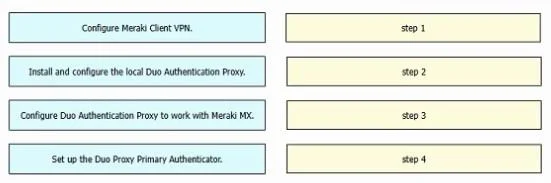
Drag and Drop Question Drag and drop the tasks from the left into order on the right to implement adding Duo multifactor authentication to Meraki Client VPN login. Answer:
The correct answer is Set up the Duo Proxy Primary Authenticator.; Install and configure the local Duo Authentication Proxy.; Configure Duo Authentication Proxy to work with Meraki MX.; Configure Meraki Client VPN. Duo MFA for Meraki Client VPN - Step Order Explained The correct order follows a dependency chain: each step creates a prerequisite for the next. You must build the authentication infrastructure before pointing any network device at it. --- Step 1: Set up the Duo Proxy Primary…
Question
Drag and Drop Question Drag and drop the tasks from the left into order on the right to implement adding Duo multifactor authentication to Meraki Client VPN login. Answer:
Exhibit
Answer Area
Drag items
Correct arrangement
- Set up the Duo Proxy Primary Authenticator.
- Install and configure the local Duo Authentication Proxy.
- Configure Duo Authentication Proxy to work with Meraki MX.
- Configure Meraki Client VPN.
Explanation
Duo MFA for Meraki Client VPN - Step Order Explained
The correct order follows a dependency chain: each step creates a prerequisite for the next. You must build the authentication infrastructure before pointing any network device at it.
Step 1: Set up the Duo Proxy Primary Authenticator
Why first: Before installing any software, you must configure what the Duo proxy will authenticate against - typically your existing directory (Active Directory, LDAP, or RADIUS). This defines the "primary" credential source (username/password) that Duo will validate before issuing the second factor. Without knowing where to send primary auth, the proxy has nothing to proxy to.
Common mistake: People assume this means "set up Duo accounts/policies." It doesn't - it means configuring the backend identity source (e.g., your AD server details) that the proxy will forward credentials to.
Step 2: Install and configure the local Duo Authentication Proxy
Why second: Now that you know what the proxy will authenticate against (Step 1), you can actually install the Duo Authentication Proxy software on a local server and configure it with those details. The proxy is the critical middleware - it sits between Meraki and both your identity source and Duo's cloud service.
Common mistake: Trying to install the proxy first without knowing the primary authenticator details results in an incomplete authproxy.cfg configuration file.
Step 3: Configure Duo Authentication Proxy to work with Meraki MX
Why third: With the proxy running, you now configure the RADIUS application section of the proxy specifically to accept connections from the Meraki MX appliance - setting the shared secret, port, and client IP that Meraki will use. This is proxy-side network/application configuration.
Common mistake: Conflating this with Step 4. This step happens on the proxy server, not in the Meraki dashboard.
Step 4: Configure Meraki Client VPN
Why last: Only now do you touch Meraki. You point the Meraki MX's Client VPN RADIUS settings at your (now fully operational) Duo proxy - entering the proxy's IP, port, and shared secret. Meraki is the consumer of everything built in steps 1–3.
Common mistake: Starting here first is a classic error. If you configure Meraki to point at a RADIUS server that doesn't exist yet, VPN authentication silently fails and debugging is harder.
The Core Mental Model
[User] → [Meraki MX] → [Duo Auth Proxy] → [Primary Auth (AD/LDAP)]
                                        ↓
                              [Duo Cloud - 2nd factor]
Build right-to-left (from the identity source outward), but configure left-to-right in your planning. The order ensures every component has a working dependency before the next layer references it.
Topics
Community Discussion
No community discussion yet for this question.