
300-740 · Question #34
Refer to the exhibit. An engineer must configure Duo SSO for Cisco Webex and add the Webex application to the Duo Access Gateway. Which two actions must be taken in Duo? (Choose two.)
The correct answer is A. Upload the application XML metadata file. E. Add a new application to the Duo platform. Configuring Duo SSO for Cisco Webex requires two actions on the Duo side: adding Webex as a new application (E) and uploading the XML metadata file (A) that Webex provides so Duo can establish the SAML trust relationship. These two steps together register the service provider…
Question
Refer to the exhibit. An engineer must configure Duo SSO for Cisco Webex and add the Webex application to the Duo Access Gateway. Which two actions must be taken in Duo? (Choose two.)
Exhibit
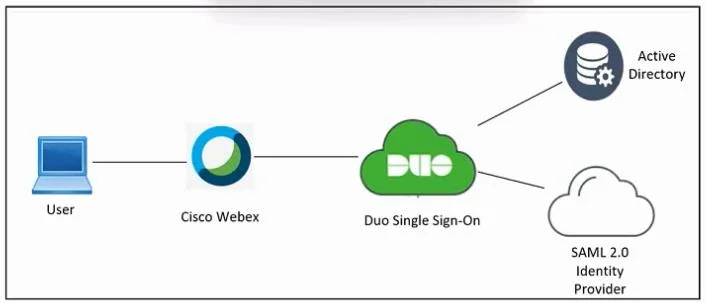
Options
- AUpload the application XML metadata file.
- BUpload the SAML application JSON file.
- CConfigure the Applications settings for Cisco Webex.
- DImport the Identity Provider metadata.
- EAdd a new application to the Duo platform.
How the community answered
(56 responses)- A71% (40)
- B4% (2)
- C16% (9)
- D9% (5)
Explanation
Configuring Duo SSO for Cisco Webex requires two actions on the Duo side: adding Webex as a new application (E) and uploading the XML metadata file (A) that Webex provides so Duo can establish the SAML trust relationship. These two steps together register the service provider (Webex) with the Duo Access Gateway and supply the technical SAML parameters (entity ID, ACS URL, certificates) needed for federated authentication.
Why the distractors are wrong:
- B - Duo uses XML-based SAML metadata, not JSON; JSON is not the standard format for SAML federation metadata exchange.
- C - Configuring application settings happens after adding the application and is done within Webex's admin portal, not initiated as a primary Duo action.
- D - Importing Identity Provider metadata is what Webex does (importing Duo's IdP metadata into Webex), not what Duo does; the direction is reversed.
Memory tip: Think of the workflow as a two-step "introduce and describe" process - you first introduce the app to Duo (Add application = E), then describe it to Duo via the SAML XML file Webex gives you (Upload XML = A). The XML always flows from the service provider to the identity provider, so Duo receives it, not sends it.
Topics
Community Discussion
No community discussion yet for this question.