
300-740 · Question #17
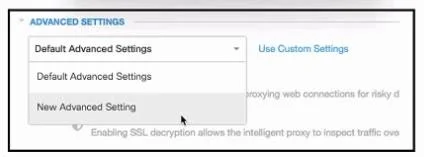
Refer to the exhibit. An engineer must configure a global allow list in Cisco Umbrella for the cisco.com domain. All other domains must be blocked. After creating a new policy and adding the…
The correct answer is C. Enable Allow-Only Mode. Enable Allow-Only Mode (C) is correct because Cisco Umbrella's "Allow-Only Mode" is a Security Settings toggle that flips the policy logic: instead of blocking specific destinations, it blocks everything except what's explicitly on your allow list. Without this setting, a…
Question
Refer to the exhibit. An engineer must configure a global allow list in Cisco Umbrella for the cisco.com domain. All other domains must be blocked. After creating a new policy and adding the cisco.com domain, the engineer attempts to access a site outside of cisco.com and is successful. Which additional Security Settings action must be taken to meet the requirement?
Exhibit
Options
- ALimit Content Access.
- BEnforce SafeSearch.
- CEnable Allow-Only Mode
- DApply Destination List.
How the community answered
(35 responses)- A6% (2)
- B3% (1)
- C83% (29)
- D9% (3)
Explanation
Enable Allow-Only Mode (C) is correct because Cisco Umbrella's "Allow-Only Mode" is a Security Settings toggle that flips the policy logic: instead of blocking specific destinations, it blocks everything except what's explicitly on your allow list. Without this setting, a policy with an allow list still permits unlisted traffic by default - which is exactly why the engineer could reach sites outside cisco.com.
- A (Limit Content Access) is a content filtering feature for restricting categories like adult content or social media - it doesn't enforce a deny-all posture for unlisted domains.
- B (Enforce SafeSearch) forces safe search on engines like Google and Bing, protecting against explicit results - it has no bearing on which domains are reachable.
- D (Apply Destination List) is already implied by the scenario (the engineer already added cisco.com to a list); applying the list alone doesn't make unlisted domains blocked.
Memory tip: Think of Allow-Only Mode as a "whitelist firewall" toggle - the allow list does nothing restrictive until you flip Umbrella into "only this list, nothing else" mode, just like a firewall default-deny policy requires you to explicitly set the default action to block.
Topics
Community Discussion
No community discussion yet for this question.