
300-720 · Question #68
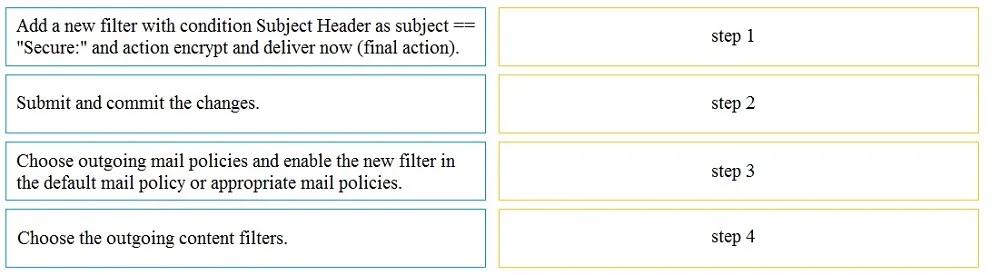
Drag and Drop Question An Encryption Profile has been set up on the Cisco ESA. Drag and drop the steps from the left for creating an outgoing content filter to encrypt emails that contains the…
The correct answer is Choose the outgoing content filters.; Add a new filter with condition Subject Header as subject == "Secure:" and action encrypt and deliver now (final action).; Choose outgoing mail policies and enable the new filter in the default mail policy or appropriate mail policies.; Submit and commit the changes. To correctly configure an outgoing content filter on a Cisco ESA for email encryption, the steps involve navigating to content filters, defining the filter, applying it to a mail policy, and then submitting the changes.
Question
Drag and Drop Question An Encryption Profile has been set up on the Cisco ESA. Drag and drop the steps from the left for creating an outgoing content filter to encrypt emails that contains the subject "Secure:" into the correct order on the right. Answer:
Exhibit
Answer Area
Drag items
Correct arrangement
- Choose the outgoing content filters.
- Add a new filter with condition Subject Header as subject == "Secure:" and action encrypt and deliver now (final action).
- Choose outgoing mail policies and enable the new filter in the default mail policy or appropriate mail policies.
- Submit and commit the changes.
Explanation
To correctly configure an outgoing content filter on a Cisco ESA for email encryption, the steps involve navigating to content filters, defining the filter, applying it to a mail policy, and then submitting the changes.
Approach. The correct sequence for configuring an outgoing content filter to encrypt emails based on a subject line on a Cisco ESA is as follows:
- Step 1: Choose the outgoing content filters. Before creating a filter, you must navigate to the correct section in the ESA interface where content filters are managed. This is typically under 'Mail Policies > Outgoing Content Filters'.
- Step 2: Add a new filter with condition Subject Header as subject == "Secure:" and action encrypt and deliver now (final action). Once in the content filters section, the next logical step is to define the filter itself, specifying its conditions (emails with subject 'Secure:') and the desired action (encrypt and deliver now).
- Step 3: Choose outgoing mail policies and enable the new filter in the default mail policy or appropriate mail policies. A content filter, once created, is not active until it is applied to one or more mail policies. You must navigate to the 'Outgoing Mail Policies' section and enable the newly created content filter within the relevant policy (e.g., the default outgoing policy or a custom policy).
- Step 4: Submit and commit the changes. Finally, on Cisco ESA and many other network appliances, configuration changes are not active until they are explicitly submitted and committed. This step saves the configuration and applies it to the running system.
Common mistakes.
- common_mistake. A common mistake would be to create the filter (Step 2) before navigating to the correct configuration section (Step 1), or to submit/commit changes (Step 4) before the filter has been enabled in a mail policy (Step 3). Forgetting to enable the filter in a mail policy means the filter, though defined, will never be applied to email traffic. Also, submitting changes prematurely would lead to an incomplete configuration. Attempting to commit changes before defining the actual filter or applying it to a policy would also be incorrect, as there would be no functional change to commit related to the objective.
Concept tested. Cisco Email Security Appliance (ESA) content filtering configuration, email encryption policies, and the workflow for implementing security features on an email gateway.
Topics
Community Discussion
No community discussion yet for this question.