
300-720 · Question #193
Drag and Drop Question Drag and drop the actions from the left into sequence on the right to validate the authenticity of email on a Cisco Secure Email Gateway by using DNS records. Answer:
The correct answer is From the Mail Policies menu, select Mail Flow Policy.; Choose Default Policy Parameters.; Open the Security Features section.; Set SPF/SIDF Verification to On. The question requires sequencing the configuration steps to enable SPF/SIDF email authenticity verification on a Cisco Secure Email Gateway, starting from policy selection down to feature activation.
Question
Exhibit
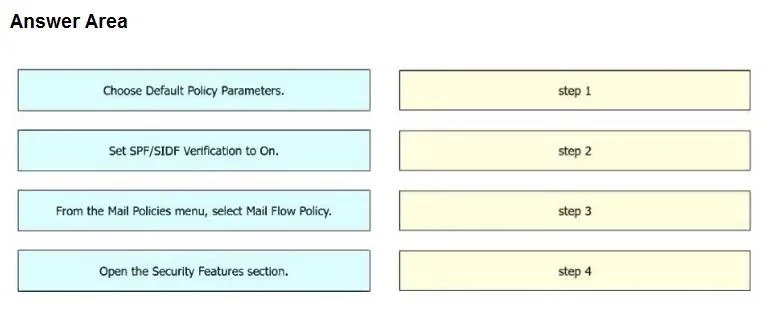
Answer Area
Drag items
Correct arrangement
- From the Mail Policies menu, select Mail Flow Policy.
- Choose Default Policy Parameters.
- Open the Security Features section.
- Set SPF/SIDF Verification to On.
Explanation
The question requires sequencing the configuration steps to enable SPF/SIDF email authenticity verification on a Cisco Secure Email Gateway, starting from policy selection down to feature activation.
Approach. The correct interaction involves dragging the actions from the left-hand source area into the right-hand target slots labeled 'step 1' through 'step 4' in the following order, which represents a logical navigation path within the Cisco Secure Email Gateway interface:
- step 1: Drag 'From the Mail Policies menu, select Mail Flow Policy.' - This is the foundational first step to access the relevant policy configuration area for email flow.
- step 2: Drag 'Choose Default Policy Parameters.' - After selecting the Mail Flow Policy, the next logical step is to delve into its parameters, often starting with the default settings.
- step 3: Drag 'Open the Security Features section.' - Within the policy parameters, email authentication settings like SPF/SIDF are typically grouped under a dedicated security section.
- step 4: Drag 'Set SPF/SIDF Verification to On.' - This is the final and specific action to enable the SPF/SIDF verification feature within the identified security section. This sequence accurately depicts the hierarchical steps required to configure this specific email security feature.
Common mistakes.
- common_mistake. Common mistakes would involve misordering the steps, particularly by trying to activate a feature or access a specific section before navigating to its parent menu or policy. For instance:
- Starting with 'Set SPF/SIDF Verification to On' or 'Open the Security Features section' would be incorrect because these actions require prior navigation to the Mail Policies and specific policy parameters. You cannot directly enable a feature without first accessing the menu where that feature resides.
- Placing 'Choose Default Policy Parameters' before 'From the Mail Policies menu, select Mail Flow Policy' would be illogical, as parameters are chosen for a specific policy.
- Skipping the 'Open the Security Features section' and attempting to 'Set SPF/SIDF Verification to On' immediately after 'Choose Default Policy Parameters' would also be incorrect, as the SPF/SIDF setting is typically nested within a security features section. The presented steps outline a hierarchical menu navigation, and deviating from this order would prevent successful configuration.
Concept tested. The core concept tested is the practical knowledge of configuring email authentication mechanisms (SPF/SIDF) on a Cisco Secure Email Gateway. This includes understanding the purpose of SPF/SIDF for email authenticity validation using DNS records, as well as the administrative steps and typical navigation paths within a Cisco email security appliance's management interface to enable such features.
Topics
Community Discussion
No community discussion yet for this question.