
300-720 · Question #190
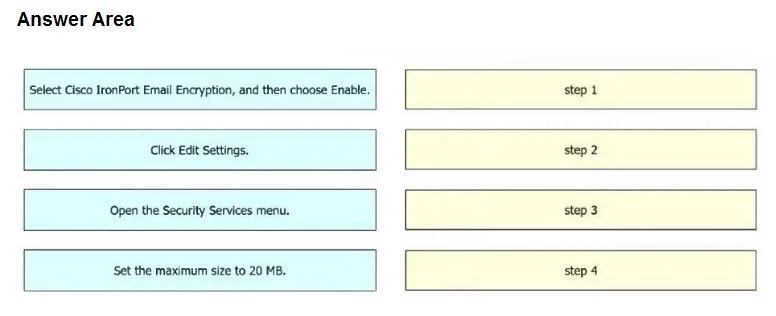
Drag and Drop Question An engineer must enable encryption on a Cisco Secure Email Gateway. The maximum size of each message must be 20 MB. Drag and drop the actions from the left into sequence on…
The correct answer is Open the Security Services menu.; Select Cisco IronPort Email Encryption, and then choose Enable.; Click Edit Settings.; Set the maximum size to 20 MB. The task requires sequencing steps to enable email encryption and set a message size limit on a Cisco Secure Email Gateway by navigating through its administrative interface.
Question
Exhibit
Answer Area
Drag items
Correct arrangement
- Open the Security Services menu.
- Select Cisco IronPort Email Encryption, and then choose Enable.
- Click Edit Settings.
- Set the maximum size to 20 MB.
Explanation
The task requires sequencing steps to enable email encryption and set a message size limit on a Cisco Secure Email Gateway by navigating through its administrative interface.
Approach. The correct interaction is to drag and drop the actions into the following sequence on the right-hand side:
- Step 1: Open the Security Services menu. (To access the relevant security features)
- Step 2: Select Cisco IronPort Email Encryption, and then choose Enable. (To specifically enable the encryption service)
- Step 3: Click Edit Settings. (To access the configuration options for the enabled encryption service)
- Step 4: Set the maximum size to 20 MB. (To apply the specific message size requirement within the service's settings)
This sequence follows a logical progression from navigating to the general service area, enabling the specific service, accessing its detailed configuration, and finally applying a specific setting.
Common mistakes.
- common_mistake. A common mistake would be to place 'Click Edit Settings' or 'Set the maximum size to 20 MB' before enabling the 'Cisco IronPort Email Encryption' service or before navigating to the 'Security Services menu'. You cannot edit settings for a service that hasn't been selected or enabled, nor can you set a specific parameter like message size without first accessing the service's configuration interface. Another error would be enabling the service and then trying to set the size before clicking 'Edit Settings', as the size setting is typically nested within the service's configuration panel.
Concept tested. The underlying technical concept being tested is the practical operational knowledge of configuring security services, specifically email encryption and related settings like message size limits, on a Cisco Secure Email Gateway (formerly Cisco IronPort). It assesses familiarity with the administrative workflow and menu navigation within such a device or platform.
Topics
Community Discussion
No community discussion yet for this question.