
300-720 · Question #187
Drag and Drop Question An engineer must enable SIDF for a mail flow policy on an incoming listener in Cisco Secure Email Gateway. Drag and drop the actions from the left into the sequence on the…
The correct answer is Select the mail flow policy.; Configure the Default Policy Parameters settings.; Set SPF/SIDF Verification to On.; Set the conformance level to SIDF. The correct sequence for enabling SIDF on a Cisco Secure Email Gateway involves selecting the mail flow policy, configuring its parameters, enabling SPF/SIDF verification, and then setting the conformance level.
Question
Exhibit
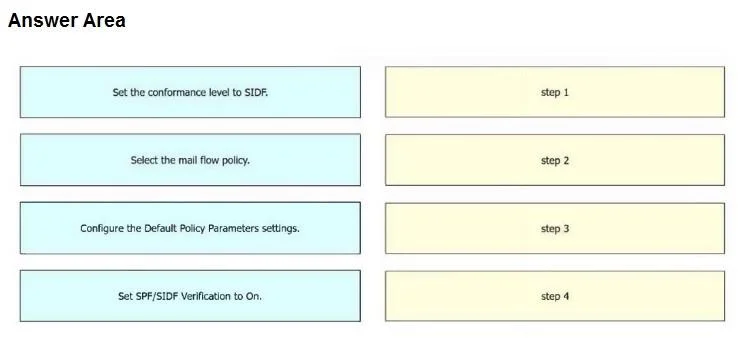
Answer Area
Drag items
Correct arrangement
- Select the mail flow policy.
- Configure the Default Policy Parameters settings.
- Set SPF/SIDF Verification to On.
- Set the conformance level to SIDF.
Explanation
The correct sequence for enabling SIDF on a Cisco Secure Email Gateway involves selecting the mail flow policy, configuring its parameters, enabling SPF/SIDF verification, and then setting the conformance level.
Approach. To enable SIDF for a mail flow policy on an incoming listener in Cisco Secure Email Gateway, the steps must be performed in a specific logical order:
- Select the mail flow policy. - Before making any changes to a policy, you must first navigate to and select the specific policy you intend to modify. This is the foundational step in any policy-based configuration.
- Configure the Default Policy Parameters settings. - Once the policy is selected, you need to access its configuration interface, which is typically found under 'Default Policy Parameters' or a similar section where general mail flow policy settings are managed.
- Set SPF/SIDF Verification to On. - Within the policy's settings, the general SPF/SIDF verification feature must be explicitly enabled ('On') before its specific operational details can be configured. This activates the underlying mechanism.
- Set the conformance level to SIDF. - After enabling the SPF/SIDF verification, you then specify the desired conformance level. The question specifically asks to enable SIDF, so setting the conformance level to 'SIDF' ensures that this particular framework is utilized and enforced by the gateway. This step refines the behavior of the newly enabled verification feature.
Common mistakes.
- common_mistake. Common mistakes include attempting to configure specific parameters (like conformance level or turning verification 'On') before selecting the target policy or before accessing its general settings. For example:
- If 'Set SPF/SIDF Verification to On' or 'Set the conformance level to SIDF' were placed before 'Select the mail flow policy' or 'Configure the Default Policy Parameters settings', it would be incorrect because you cannot modify settings for a policy you haven't yet specified or accessed.
- Placing 'Set the conformance level to SIDF' before 'Set SPF/SIDF Verification to On' would also be incorrect, as you typically enable the overall verification feature first, and then configure its specific modes or levels. You cannot set the 'level' of something that isn't yet active.
Concept tested. The core concept tested is the procedural knowledge required to configure email authentication mechanisms (specifically SPF/SIDF) within a Cisco Secure Email Gateway (SEG) or similar email security appliance. It assesses understanding of the logical flow of configuration steps, including policy selection, accessing policy settings, enabling a specific feature, and then configuring feature-specific parameters.
Topics
Community Discussion
No community discussion yet for this question.