
300-720 · Question #117
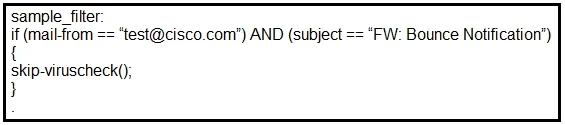
Refer to the exhibit. What results from this filter configuration?
The correct answer is C. Action is skipping all antivirus checks for the mail. The filter configuration, likely using the skip-av() action, instructs the Cisco ESA to bypass antivirus scanning for messages that meet the filter's conditions.
Question
Refer to the exhibit. What results from this filter configuration?
Exhibit
Options
- AAction is skipping all antispam checks for the mail.
- BAction is applied to all mail from [email protected].
- CAction is skipping all antivirus checks for the mail.
- DAction is applied to all mail that has the subject "FW: Bounce Notification."
How the community answered
(25 responses)- A4% (1)
- C92% (23)
- D4% (1)
Why each option
The filter configuration, likely using the `skip-av()` action, instructs the Cisco ESA to bypass antivirus scanning for messages that meet the filter's conditions.
Skipping antispam checks would require a distinct `skip-spam()` action, which is different from skipping antivirus.
The action to skip all antivirus checks for the mail is achieved on a Cisco ESA by using the `skip-av()` action within a content filter. This action explicitly prevents the Anti-Virus engine from scanning matching messages, often for performance optimization or when other security layers handle the scanning.
Concept tested: Cisco ESA content filter actions - skip antivirus
Source: https://www.cisco.com/c/en/us/td/docs/security/esa/esa12-0/user_guide/b_ESA_Admin_Guide_12_0/b_ESA_Admin_Guide_12_0_chapter_0100.html#con_1143899
Topics
Community Discussion
No community discussion yet for this question.