
300-715 · Question #409
Drag and Drop Question An engineer must configure Cisco TrustSec in Cisco ISE. The engineer completes the Active Directory integration but must create a security group. Drag and drop the…
The correct answer is From Security Groups, click Add.; Select Results and TrustSec.; Enter TrustSec_Device as the group name, and then click Save.; From Policy, click Policy Elements. This question assesses the correct sequential steps for creating a security group for Cisco TrustSec within the Cisco ISE administrative interface.
Question
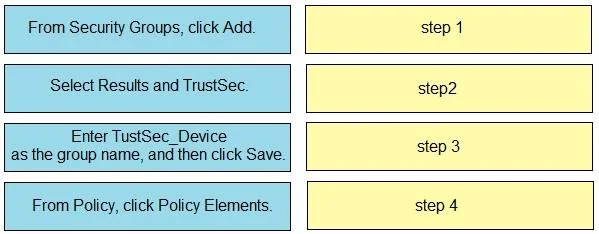
Drag and Drop Question An engineer must configure Cisco TrustSec in Cisco ISE. The engineer completes the Active Directory integration but must create a security group. Drag and drop the configuration steps from the left into the sequence on the right to create the security group. Answer:
Exhibit
Answer Area
Drag items
Correct arrangement
- From Security Groups, click Add.
- Select Results and TrustSec.
- Enter TrustSec_Device as the group name, and then click Save.
- From Policy, click Policy Elements.
Explanation
This question assesses the correct sequential steps for creating a security group for Cisco TrustSec within the Cisco ISE administrative interface.
Approach. The correct interaction requires dragging the steps from the left to the right in the following order:
- Drag 'From Policy, click Policy Elements.' to 'step 1'. This is the initial navigation point to manage policy components.
- Drag 'Select Results and TrustSec.' to 'step 2'. Within Policy Elements, you navigate to 'Results' to define what actions ISE takes, and 'TrustSec' is the specific area for Security Group Tags (SGTs).
- Drag 'From Security Groups, click Add.' to 'step 3'. Once in the TrustSec results section, you can manage Security Groups, and 'Add' is the action to create a new one.
- Drag 'Enter TustSec_Device as the group name, and then click Save.' to 'step 4'. This is the final step where the actual group is named and committed to the configuration. This sequence represents the logical flow for configuring a new security group in Cisco ISE for TrustSec policies.
Common mistakes.
- common_mistake. A common mistake is to misorder the navigational steps or to attempt to add a group without first navigating to the correct section. For instance, selecting 'From Security Groups, click Add' as the first step would be incorrect because one must first access the Policy Elements menu and then navigate through Results and TrustSec to reach the Security Groups management page. Similarly, attempting to 'Enter TustSec_Device as the group name, and then click Save' before initiating the 'Add' action would be procedurally wrong. The order must follow the hierarchical menu structure and operational workflow of the Cisco ISE GUI.
Concept tested. This question tests the candidate's operational knowledge and familiarity with the Cisco Identity Services Engine (ISE) graphical user interface (GUI) for configuring network access control policies. Specifically, it assesses the ability to navigate the menu structure and perform a multi-step administrative task-creating a security group-which is a fundamental component for implementing Cisco TrustSec.
Topics
Community Discussion
No community discussion yet for this question.