
300-715 · Question #403
Drag and Drop Question A network engineer must add a Cisco switch named HQ-IDF100 to Cisco ISE for TACACS+ device administration with a shared secret of PASSWORD1 and an IP address of 10.10.10.10…
The correct answer is Press Add. Name:HQ IP:10.10.10/32; Access Administration-Network Devices.; Check RADIUS Authentication Settings. Shared Secret PASSWORD1; Click Submit. To add a network device to Cisco ISE for TACACS+ administration, the correct sequence involves navigating to the Network Devices section, adding the device with its basic details, configuring the shared secret, and then submitting the configuration.
Question
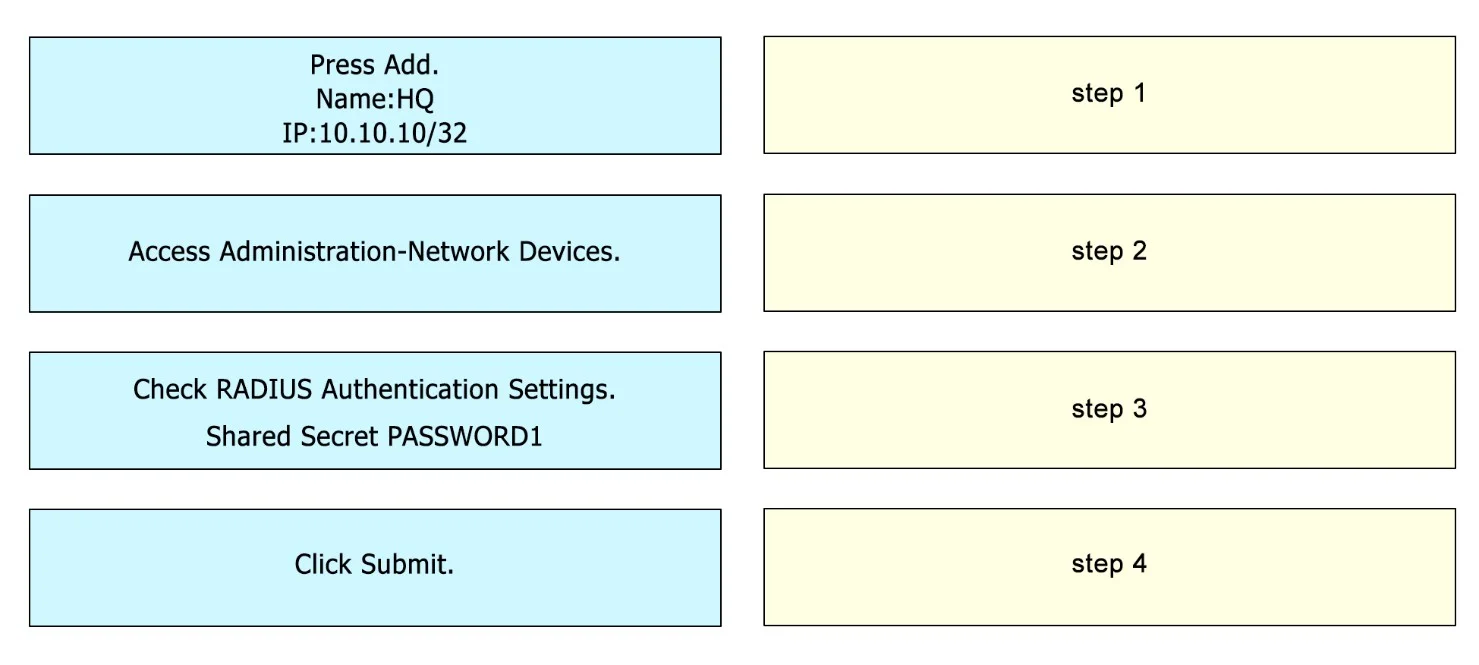
Drag and Drop Question A network engineer must add a Cisco switch named HQ-IDF100 to Cisco ISE for TACACS+ device administration with a shared secret of PASSWORD1 and an IP address of 10.10.10.10. Drag and drop the configuration steps from the left into the sequence on the right. Answer:
Exhibit
Answer Area
Drag items
Correct arrangement
- Press Add. Name:HQ IP:10.10.10/32
- Access Administration-Network Devices.
- Check RADIUS Authentication Settings. Shared Secret PASSWORD1
- Click Submit.
Explanation
To add a network device to Cisco ISE for TACACS+ administration, the correct sequence involves navigating to the Network Devices section, adding the device with its basic details, configuring the shared secret, and then submitting the configuration.
Approach. The correct interaction is to drag and drop the configuration steps into the following sequence:
-
Step 1: Access Administration-Network Devices. - Before configuring any network device in Cisco ISE, you must navigate to the correct section of the portal where network devices are managed. This is the logical starting point for this task.
-
Step 2: Press Add. Name:HQ IP:10.10.10/32 - Once in the 'Network Devices' section, the next step is to initiate the addition of a new device. This typically involves clicking an 'Add' button and then providing the basic identification details for the device, such as its name and IP address (10.10.10/32 represents the single IP 10.10.10.10).
-
Step 3: Check RADIUS Authentication Settings. Shared Secret PASSWORD1 - After defining the device's name and IP, you need to configure the authentication credentials that ISE will use to communicate securely with this network device. The shared secret (PASSWORD1) is crucial for both RADIUS and TACACS+ to authenticate the Network Access Device (NAD) itself with ISE. While the question specifies TACACS+, the shared secret is often configured under general authentication settings, frequently labeled 'RADIUS Authentication Settings', and is applicable across authentication methods.
-
Step 4: Click Submit. - As with any configuration change in a graphical user interface, the final step is to save or submit the changes to ensure they are applied and persistent within Cisco ISE.
Common mistakes.
- common_mistake. Common mistakes include incorrectly ordering the steps. For example:
- Starting with 'Press Add...' before 'Access Administration-Network Devices.' is wrong because you need to navigate to the correct management section first.
- Placing 'Click Submit.' too early, such as before configuring the shared secret or even before adding the device's basic information, would result in an incomplete or invalid configuration.
- Placing 'Check RADIUS Authentication Settings. Shared Secret PASSWORD1' before 'Press Add...' is incorrect as you need to define the device first before configuring its specific authentication parameters. Misunderstanding that the shared secret is fundamental for both RADIUS and TACACS+ for authenticating the NAD to ISE, even when the scenario mentions TACACS+, can lead to confusion about its placement.
Concept tested. The core technical concept being tested is the proper workflow and configuration steps for adding a network access device (NAD) to Cisco Identity Services Engine (ISE) for device administration, specifically focusing on the initial identification and shared secret configuration essential for secure communication between ISE and the NAD, irrespective of the final authentication protocol (RADIUS or TACACS+) used for user access.
Topics
Community Discussion
No community discussion yet for this question.