
300-715 · Question #392
Drag and Drop Question An engineer must configure a new user on the local internal database of the Cisco ISE so that the user has access to the resources and services on the Cisco ISE network. Drag…
The correct answer is Click Administration, and then click Identity Management.; Click Identities, and then click Users.; Click Add (+) to create a new user.; Enter the user details, and then click Save. This question tests the candidate's operational knowledge of Cisco ISE by requiring them to correctly order the steps for creating a new local user account.
Question
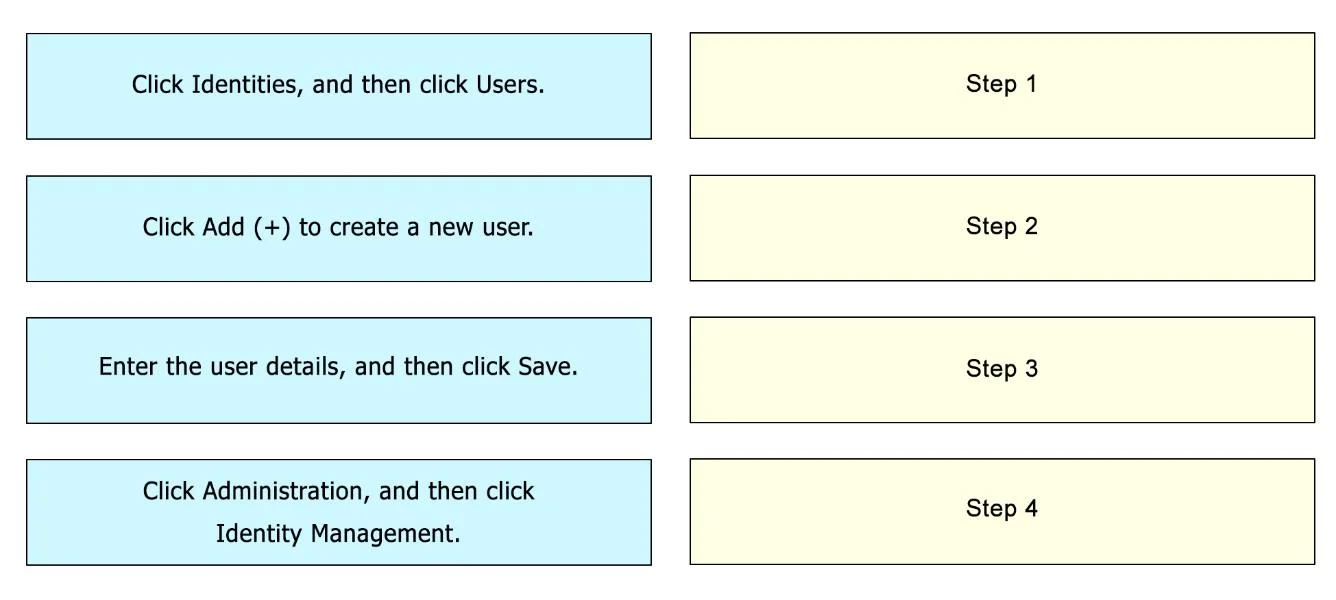
Drag and Drop Question An engineer must configure a new user on the local internal database of the Cisco ISE so that the user has access to the resources and services on the Cisco ISE network. Drag and drop the configuration steps from the left into the sequence on the right. Answer:
Exhibit
Answer Area
Drag items
Correct arrangement
- Click Administration, and then click Identity Management.
- Click Identities, and then click Users.
- Click Add (+) to create a new user.
- Enter the user details, and then click Save.
Explanation
This question tests the candidate's operational knowledge of Cisco ISE by requiring them to correctly order the steps for creating a new local user account.
Approach. The correct interaction is to drag the configuration steps from the left into the numbered sequence on the right to reflect the correct workflow for creating a user in Cisco ISE. Based on the typical navigation flow within Cisco ISE for user management, and implicitly confirmed by the provided solution image, the steps should be ordered as follows:
- Step 1: Drag 'Click Administration, and then click Identity Management.' to the 'Step 1' target. This is the initial high-level navigation path to access identity management features.
- Step 2: Drag 'Click Identities, and then click Users.' to the 'Step 2' target. Within Identity Management, 'Identities' and then 'Users' is the next logical drill-down to manage user accounts.
- Step 3: Drag 'Click Add (+) to create a new user.' to the 'Step 3' target. Once on the Users page, the '+' or 'Add' button is used to initiate the creation of a new user.
- Step 4: Drag 'Enter the user details, and then click Save.' to the 'Step 4' target. After clicking 'Add', the user details are entered, and then the configuration is committed by clicking 'Save'.
This sequence reflects the logical and actual navigation path in the Cisco ISE administration interface for local user creation.
Common mistakes.
- common_mistake. Common mistakes include misordering the navigation steps, such as placing 'Click Identities, and then click Users' before 'Click Administration, and then click Identity Management'. Another error would be to place 'Enter the user details, and then click Save' before 'Click Add (+)', as you must first initiate the creation of a new user before you can input and save their details. Any deviation from the hierarchical and sequential flow of GUI navigation for user creation in Cisco ISE would be incorrect, as it would not lead to the successful creation of a new user.
Concept tested. The core concept being tested is the operational knowledge and navigation proficiency within the Cisco Identity Services Engine (ISE) administration interface, specifically the workflow for creating a new local user account in its internal database.
Topics
Community Discussion
No community discussion yet for this question.