
300-715 · Question #386
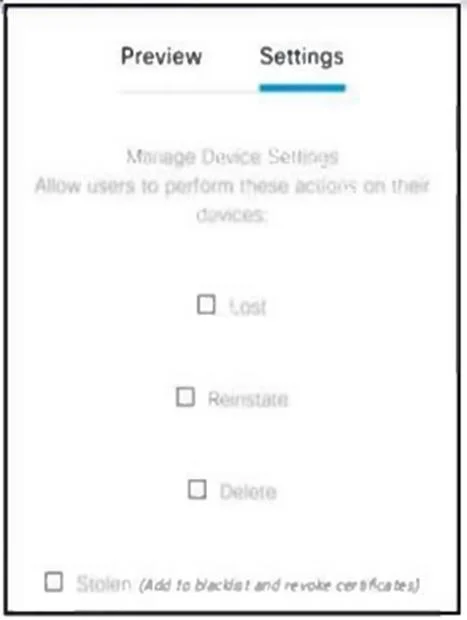
Refer to the exhibit. An engineer observes that users sometimes find their device after the device is declared stolen and block listed in Cisco ISE. What must be selected from the My Devices portal…
The correct answer is B. Reinstate. When a device previously marked as stolen and blocklisted in Cisco ISE's My Devices portal is recovered, the 'Reinstate' action must be selected to allow the device to reconnect to the network.
Question
Refer to the exhibit. An engineer observes that users sometimes find their device after the device is declared stolen and block listed in Cisco ISE. What must be selected from the My Devices portal in Cisco ISE to allow the users to reconnect their devices to the network?
Exhibit
Options
- ARegister
- BReinstate
- CLost
- DStolen
How the community answered
(25 responses)- A4% (1)
- B76% (19)
- C8% (2)
- D12% (3)
Why each option
When a device previously marked as stolen and blocklisted in Cisco ISE's My Devices portal is recovered, the 'Reinstate' action must be selected to allow the device to reconnect to the network.
Register is used for the initial enrollment of a new device into the system, not for reactivating a device that was previously blocklisted.
Reinstate is the specific action in the Cisco ISE My Devices portal that revokes a 'stolen' or 'blocklisted' status from a device, allowing it to be re-provisioned and re-authenticate to the network. This restores the device's network access privileges upon recovery.
Lost is a status that marks a device as missing, leading to blocklisting, and does not provide functionality to reactivate it.
Stolen is a status that marks a device as stolen, resulting in blocklisting, and does not provide functionality to reactivate it.
Concept tested: Cisco ISE My Devices Portal Device Management Actions
Source: https://www.cisco.com/c/en/us/td/docs/security/ise/3-0/admin_guide/b_ise_30_admin_guide/b_ise_30_admin_guide_chapter_0110.html#concept_AD1CFB0D47C9482F8F02C1F50A8650F8
Topics
Community Discussion
No community discussion yet for this question.