
300-715 · Question #296
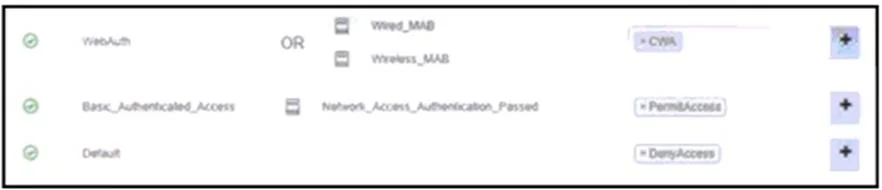
Drag and Drop Question Refer to the exhibit. An engineer must create a web authentication access policy in Cisco ISE that matches the exhibit. Drag and drop the configuration steps from the left…
The correct answer is From Work Centers, click Network Access, and then click Policy Sets.; Drill down to the default policy set.; Insert a new rule above the Basic_Authenticated_Access rule and name the rule WebAuth.; For the conditions, select Wired_MAB and Wireless_MAB and ensure that the OR operator is used with the conditions.; Use the Central Web authentication authorization profile. This question tests the ability to correctly sequence the steps for configuring a Central Web Authentication (CWA) authorization policy in Cisco ISE, including navigation, rule creation, condition setup, and authorization profile selection.
Question
Drag and Drop Question Refer to the exhibit. An engineer must create a web authentication access policy in Cisco ISE that matches the exhibit. Drag and drop the configuration steps from the left into sequence on the right to accomplish this task. Answer:
Exhibit
Answer Area
Drag items
Correct arrangement
- From Work Centers, click Network Access, and then click Policy Sets.
- Drill down to the default policy set.
- Insert a new rule above the Basic_Authenticated_Access rule and name the rule WebAuth.
- For the conditions, select Wired_MAB and Wireless_MAB and ensure that the OR operator is used with the conditions.
- Use the Central Web authentication authorization profile.
Explanation
This question tests the ability to correctly sequence the steps for configuring a Central Web Authentication (CWA) authorization policy in Cisco ISE, including navigation, rule creation, condition setup, and authorization profile selection.
Approach. The correct sequence for configuring the WebAuth policy rule, as shown in the answer image, follows a logical flow for Cisco ISE policy creation:
- From Work Centers, click Network Access, and then click Policy Sets. - This is the initial navigation path to access the authorization policy sets within Cisco ISE.
- Drill down to the default policy set. - Authorization rules are configured within specific policy sets. Assuming the 'WebAuth' rule shown is part of the default policy set or a relevant one, drilling down to it is the next logical step.
- Insert a new rule above the Basic_Authenticated_Access rule and name the rule WebAuth. - The exhibit clearly shows the 'WebAuth' rule positioned above 'Basic_Authenticated_Access'. This placement is crucial because ISE processes rules from top to bottom, and WebAuth is typically a pre-authentication step for unauthenticated users, which must occur before basic authenticated access.
- For the conditions, select Wired_MAB and Wireless_MAB and ensure that the OR operator is used with the conditions. - The exhibit shows 'Wired_MAB OR Wireless_MAB' as the conditions for the 'WebAuth' rule, meaning the policy applies to devices attempting MAC Authentication Bypass (MAB) on either wired or wireless networks.
- Use the Central Web Authentication authorization profile. - The exhibit shows 'CWA' as the authorization profile for the 'WebAuth' rule, which is the profile responsible for redirecting users to a web portal for authentication.
Common mistakes.
- common_mistake. Common mistakes include misordering the navigation steps, which would prevent access to policy configuration. A significant error would be placing the 'WebAuth' rule below the 'Basic_Authenticated_Access' rule or the 'Default' rule. If 'WebAuth' were placed lower, devices matching 'Basic_Authenticated_Access' conditions would be granted 'PermAccess' before reaching the web authentication prompt, effectively bypassing CWA. Misconfiguring the conditions (e.g., using 'AND' instead of 'OR' between 'Wired_MAB' and 'Wireless_MAB', or selecting incorrect MAB types) would prevent the policy from matching the intended devices. Selecting an incorrect authorization profile would either grant inappropriate access or fail to redirect users to the CWA portal.
Concept tested. Cisco Identity Services Engine (ISE) authorization policy configuration, including policy set navigation, rule creation and order, condition definition (e.g., MAC Authentication Bypass - MAB), and authorization profile assignment (e.g., Central Web Authentication - CWA). The underlying concept of policy evaluation order and its impact on network access control is critical.
Topics
Community Discussion
No community discussion yet for this question.