
300-710 · Question #402
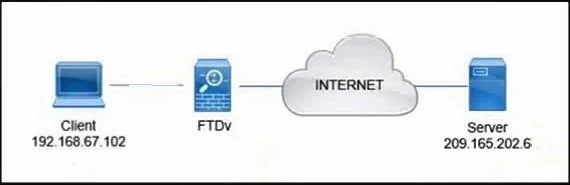
Refer to the exhibit. A client that has IP address 192.168.67.102 reports issues when connecting to a remote server. Based on the topology and output of packet tracer tool, which action resolves the…
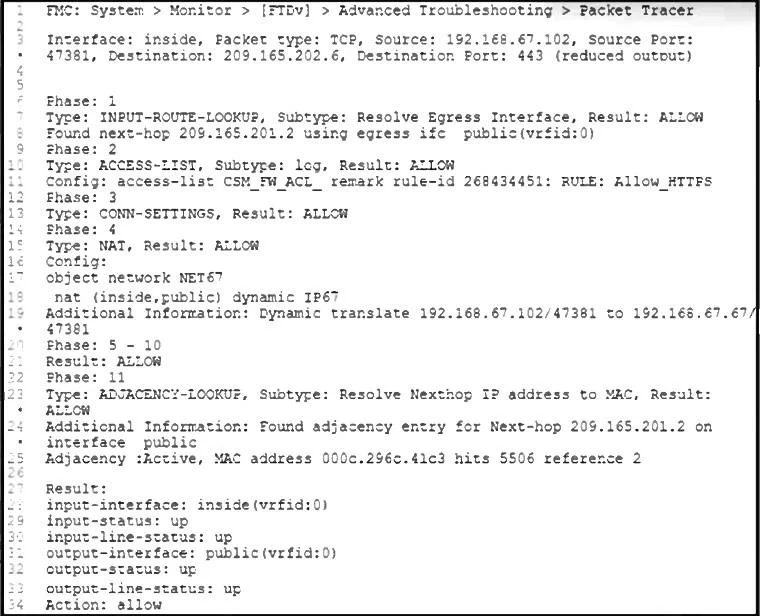
The correct answer is B. Restart the client-side application. The packet tracer output shows all phases resulted in ALLOW, NAT translation is successfully applied, and routing is resolved with an active adjacency entry for the next hop. This indicates that the FTDv is functioning correctly, and there are no issues on the firewall or its…
Question
Refer to the exhibit. A client that has IP address 192.168.67.102 reports issues when connecting to a remote server. Based on the topology and output of packet tracer tool, which action resolves the connectivity issue?
Exhibits
Options
- AUnblock the access rule on FTDv
- BRestart the client-side application
- CAdd the route to the destination
- DReconfigure NAT on FTDv
How the community answered
(32 responses)- A13% (4)
- B47% (15)
- C31% (10)
- D9% (3)
Explanation
The packet tracer output shows all phases resulted in ALLOW, NAT translation is successfully applied, and routing is resolved with an active adjacency entry for the next hop. This indicates that the FTDv is functioning correctly, and there are no issues on the firewall or its policies. Therefore, the issue likely resides with the client application, and restarting it can resolve temporary session or connectivity problems.
Topics
Community Discussion
No community discussion yet for this question.