
300-710 · Question #390
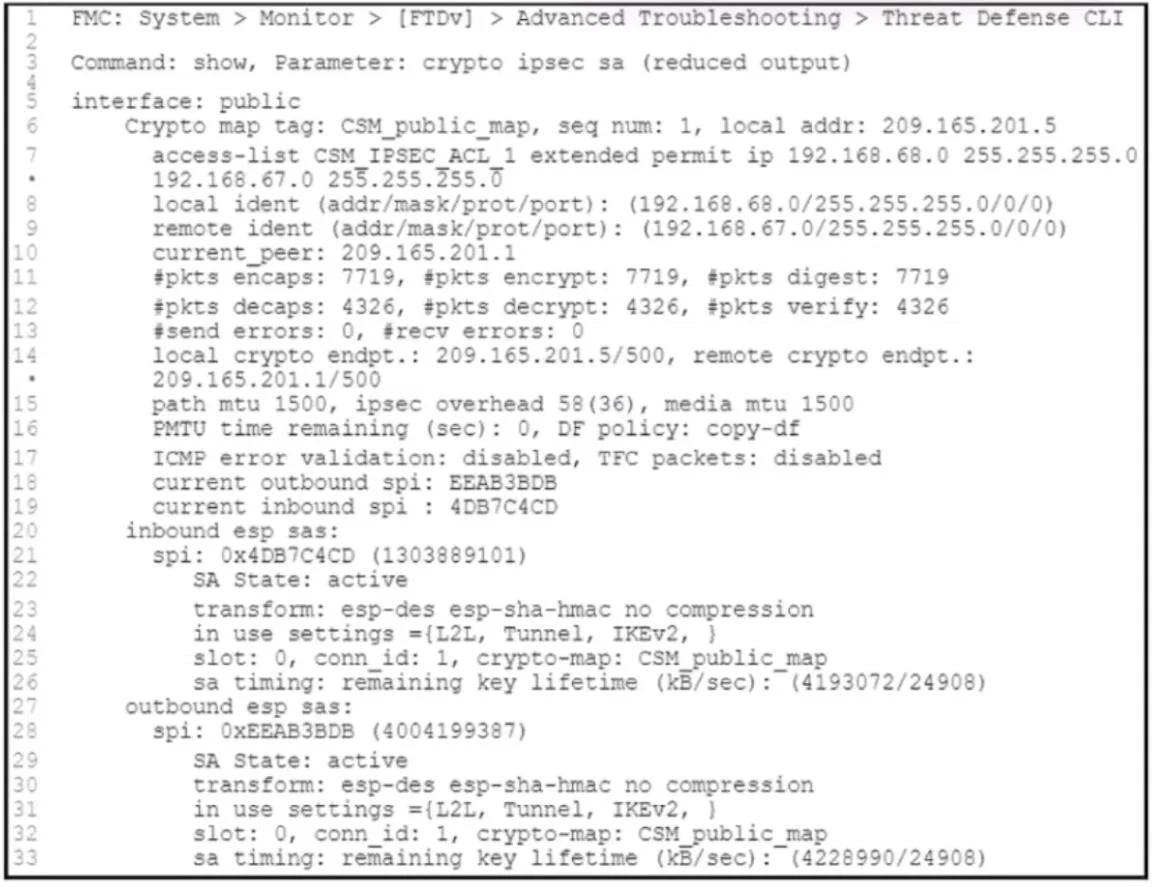
Refer to the exhibit. An engineer is troubleshooting connectivity issues over a VPN tunnel. Users from the 192.168.68.0/24 network report that they cannot connect to a remote web server that has an…
The correct answer is A. Unblock the remote firewall connection. D. Match the crypto access control list. The tunnel SAs are active, and local NAT/ACLs already allow the traffic. Connectivity failures in this state are typically due to (1) mismatched proxy IDs/crypto ACLs between peers, and/or (2) the remote firewall blocking the return traffic. Adjust the crypto ACLs so both…
Question
Refer to the exhibit. An engineer is troubleshooting connectivity issues over a VPN tunnel. Users from the 192.168.68.0/24 network report that they cannot connect to a remote web server that has an IP address of 192.168.67.100. The engineer confirms that NAT and access control rules on the local Cisco Secure Firewall Threat Defense Virtual will allow the connection. Which two configuration changes must the engineer make to resolve the connectivity issues? (Choose two.)
Exhibit
Options
- AUnblock the remote firewall connection.
- BSet the VPN to support two-way traffic.
- CBring the VPN tunnel up.
- DMatch the crypto access control list.
- EReconfigure the web server.
How the community answered
(37 responses)- A73% (27)
- B16% (6)
- C3% (1)
- E8% (3)
Explanation
The tunnel SAs are active, and local NAT/ACLs already allow the traffic. Connectivity failures in this state are typically due to (1) mismatched proxy IDs/crypto ACLs between peers, and/or (2) the remote firewall blocking the return traffic. Adjust the crypto ACLs so both sides’ encryption domains match (192.168.68.0/24 ↔ 192.168.67.0/24) and ensure the remote firewall policy permits the web traffic.
Topics
Community Discussion
No community discussion yet for this question.