
300-710 · Question #360
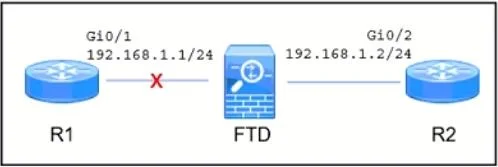
Refer to the exhibit. A Cisco Secure Firewall Threat Defense (FTD) device is deployed in inline mode with an inline set. The network engineer wants router R2 to remove the directly connected route…
The correct answer is A. Implement the Propagate Link Stale option on the Secure FTD device. The 'Propagate Link State' option on a Cisco Secure Firewall Threat Defense inline set causes the FTD to automatically bring down the paired interface when one interface in the inline set loses link. In this scenario, when the cable between R1 and FTD is disconnected, FTD…
Question
Refer to the exhibit. A Cisco Secure Firewall Threat Defense (FTD) device is deployed in inline mode with an inline set. The network engineer wants router R2 to remove the directly connected route 192.168.1.0/24 from its routing table when the cable between routed R1 and the Secure FTD device Is disconnected. Which action must the engineer take?
Exhibit
Options
- AImplement the Propagate Link Stale option on the Secure FTD device
- BEstablish a routing protocol between R1 and R2.
- CDisable hardware bypass on the Secure FTD device.
- DImplement autostate functionality on the Gi0/2 interface of R2
How the community answered
(31 responses)- A74% (23)
- B3% (1)
- C10% (3)
- D13% (4)
Explanation
The 'Propagate Link State' option on a Cisco Secure Firewall Threat Defense inline set causes the FTD to automatically bring down the paired interface when one interface in the inline set loses link. In this scenario, when the cable between R1 and FTD is disconnected, FTD detects the link loss and brings down its interface toward R2. This causes R2 to also detect a link-down event on its connected interface, prompting it to remove the directly connected route 192.168.1.0/24 from its routing table. Without this feature, R2 would remain unaware of the upstream failure and continue routing traffic toward a dead path.
Topics
Community Discussion
No community discussion yet for this question.