
300-710 · Question #356
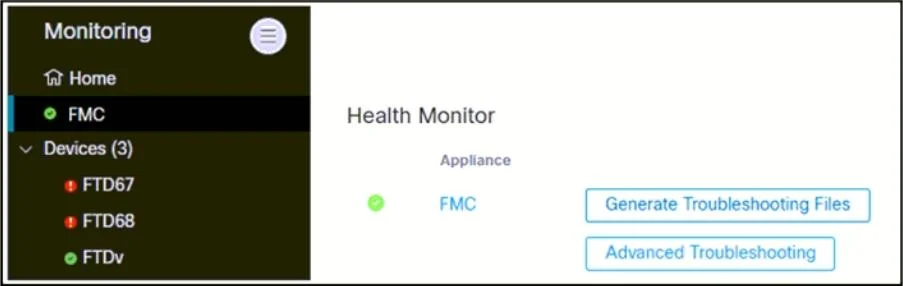
Refer to the exhibit. An engineer generates troubleshooting files in Cisco Secure Firewall Management Center (FMC). A successfully completed task is removed before the files are downloaded. Which…
The correct answer is D. Go to expert mode on Secure FMC, list the contents of/Var/common, and determine the E. Click System Monitoring, then Audit to determine the correct filename from the line containing. When a troubleshooting file generation task completes but is dismissed from the task list before downloading, the files still physically exist on the FMC filesystem. Two actions are needed: First (E), navigate to System > Monitoring > Audit in FMC - the audit log records all…
Question
Refer to the exhibit. An engineer generates troubleshooting files in Cisco Secure Firewall Management Center (FMC). A successfully completed task is removed before the files are downloaded. Which two actions must be taken to determine the filename and obtain the generated troubleshooting files without regenerating them? (Choose two.)
Exhibit
Options
- AUse an FTP client Hi expert mode on Secure FMC to upload the files to the FTP server.
- BGo to the same screen as shown in the exhibit, click Advanced Troubleshooting, enter the rile
- CConnect to CU on the FTD67 and FTD66 devices and copy the tiles from flash to the PIP
- DGo to expert mode on Secure FMC, list the contents of/Var/common, and determine the
- EClick System Monitoring, then Audit to determine the correct filename from the line containing
How the community answered
(31 responses)- A3% (1)
- B3% (1)
- C10% (3)
- D84% (26)
Explanation
When a troubleshooting file generation task completes but is dismissed from the task list before downloading, the files still physically exist on the FMC filesystem. Two actions are needed: First (E), navigate to System > Monitoring > Audit in FMC - the audit log records all system events including the exact filename generated during the task. Second (D), access FMC expert mode (Linux shell) and list the contents of /var/common/, which is the directory where FMC stores generated troubleshooting files. The engineer can then copy the file using SCP or other methods. FTP upload (A) requires knowing the filename first. Connecting to FTD devices (C) is incorrect because the files reside on FMC, not on the FTD devices.
Topics
Community Discussion
No community discussion yet for this question.