
300-710 · Question #245
With Cisco AMP for Endpoints, which option shows a list of all files that have been executed in your environment?
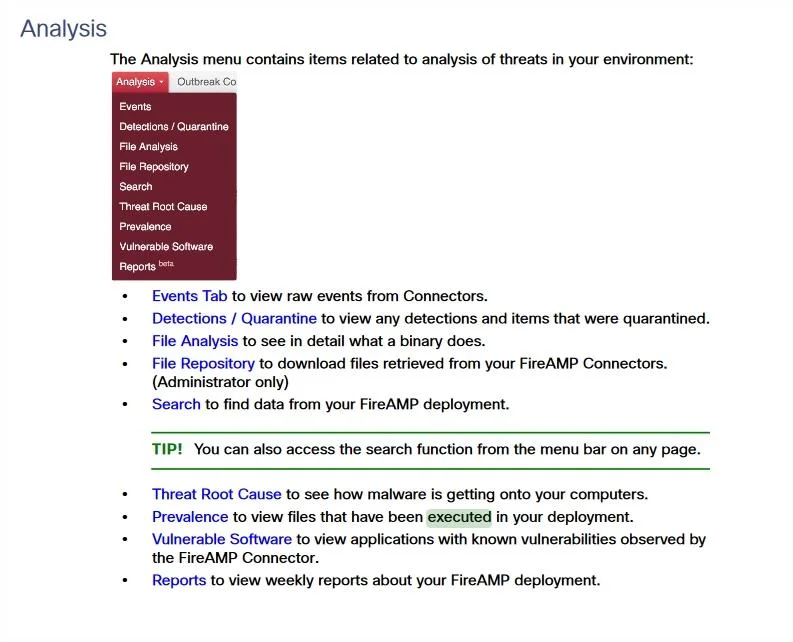
The correct answer is D. prevalence. In Cisco AMP for Endpoints (now Secure Endpoint), the 'Prevalence' view provides a comprehensive list of all files that have been executed across the environment. This feature details how common or widespread a particular file is among the endpoints.
Question
With Cisco AMP for Endpoints, which option shows a list of all files that have been executed in your environment?
Exhibit
Options
- Avulnerable software
- Bfile analysis
- Cdetections
- Dprevalence
- Ethreat root cause
How the community answered
(46 responses)- B2% (1)
- D96% (44)
- E2% (1)
Why each option
In Cisco AMP for Endpoints (now Secure Endpoint), the 'Prevalence' view provides a comprehensive list of all files that have been executed across the environment. This feature details how common or widespread a particular file is among the endpoints.
Vulnerable software lists applications with known security flaws, not a general list of all executed files.
File analysis provides detailed reports on individual files, including their behavior and characteristics, rather than a cumulative list of all executed files.
Detections show alerts for malicious activity or files, not a comprehensive list of all executed files, benign or otherwise.
In Cisco AMP for Endpoints (Secure Endpoint), 'Prevalence' is the feature that displays a list of all files that have been executed in your environment, along with information about how many endpoints have executed each file, giving insight into their commonality.
Threat root cause provides a visual timeline of a detected attack, explaining how it started and progressed, not a list of all executed files.
Concept tested: Cisco AMP for Endpoints features
Source: https://docs.amp.cisco.com/SecureEndpointConsoleGuide.pdf
Topics
Community Discussion
No community discussion yet for this question.